This is part 2 of our “first look” series on Microsoft’s Tenant Governance product. Refer to part 1 in the series for the basics, as well as our previous articles on UTCM (here and here) for more details.
Tenant discovery process
An optional part of the TG product is the related tenant discovery process, designed to give you better visibility into tenants that might be of interest. Now, I will be the first to say that some of the “signals” used for the discovery process are just a bit too opportunistic, and will likely generate a lot of unnecessary entries. Luckily, you can easily filter the less relevant entries out, and focus only on the stronger signals.
To enable the tenant discovery flow, navigate to the Related tenants page and hit Discover related tenants. Note that this is a one-time, irreversible operation, and it can take up to 48h for the process to complete. You can also enable it via the Graph API, the downside being that only delegate permissions are currently supported for this method. Make sure you have the TenantGovernance-Setting.ReadWrite.All permission and issue a POST request against the following endpoint:
POST https://graph.microsoft.com/beta/directory/tenantGovernance/settings/enableRelatedTenants

Once you toggle discovery on, the service will examine things like Azure Billing relationships, GDAP, Entra sign-in logs, B2B policies, B2B Guest access, and so on, and present you with a list of “related” tenants. The full list of signals and metrics to be examined is listed in the official documentation, along with some recommendations on how to interpret the results. Related tenants returned via the “Multitenant applications” signal seem to feature the publishers of apps such as PowerShell Gallery or LinkedIn, so you can expect to see multiple Microsoft and ISV tenants. My recommendation here would be to always rely on multiple signals, or ignore the “Multitenant applications” signal altogether.
 Another recommendation would be to adjust the list of columns for the list view, as much of the metadata retrieved is hidden by default. Alternatively, you can obtain additional details by clicking the corresponding link for each entry returned by the discovery process. In the tenant details page, you will be able to get a detailed breakdown per signal. A quick entry point for creating a new governing relationship is also exposed under the details page. You can of course get the same details via the Graph API:
List all related tenants
GET https://graph.microsoft.com/beta/directory/tenantGovernance/relatedTenants

#Get details on particular tenant
GET https://graph.microsoft.com/beta/directory/tenantGovernance/relatedTenants/9b65415d-edd3-45ec-b77b-f30286e25fa7
 Both methods require the TenantGovernance-RelatedTenant.Read.All permission and are supported for delegate and application permissions alike.
The list of related tenants and corresponding signals is refreshed on a daily basis. While the UI does not expose any control to manually trigger a refresh, you can do so via the Graph API:
POST https://graph.microsoft.com/beta/directory/tenantGovernance/relatedTenants/refresh
Unfortunately, this is another method for which only delegate permissions are supported. To be more specific, you will need the TenantGovernance-RelatedTenant.ReadWrite.All scope.
Overall, tenant discovery is easy to enable and work with. It’s purely optional, and you can very well use Tenant Governance without enabling discovery. Should you decide to enable it (and have the necessary licensing for it, namely Entra ID Suite or Entra ID Governance SKUs), be prepared to spend some time sorting out the list of related tenants. Do not treat entries from the list as “must”, but more as “maybe”. In fact, here’s what Microsoft says about it:
No. Related tenants don’t imply ownership of a discovered tenant. Related tenants represent tenants that have historical or active relationships with your tenant based on discovery signals. The feature provides situational awareness by surfacing tenant connections based on evidence already present across identity, application, and billing systems. This awareness enables organizations to make informed governance decisions.
Still, tenant discovery/related tenants are an important entry point for sending governance requests in some scenarios, so do consider this functionality as you prepare to use Tenant Governance.
Secure tenant creation
The last feature included in the Tenant governance product is Secure Tenant Creation – a process that ensures that the newly created tenant is managed from its inception. To facilitate this, a new governance relationship is provisioned at creation time and the billing for the tenant is linked to the governing tenant’s Microsoft billing account. As mentioned previously, a shared billing is the strongest possible “related tenant” signal, and one that qualifies you to leverage the two-step flow, whenever the need for manual governance relationship creation occurs.
Now, the UI mentions that the Secure Tenant Creation feature is currently in private preview, although clicking the button is going to take you to the relevant page, regardless. The process itself is pretty standard: provide the desired tenant name, and the initial domain (MOERA) value. Next, select the tenant’s Country/Region. The new step is selecting a subscription for the new tenant, which must be one of the subscriptions available to the governing tenant.
 As part of the creation process, an automatic governance relationship will be provisioned. The default template will be used and you have no option to select a different one. The tenant will be provisioned with the Microsoft Entra ID Free tier, hence no additional charges will be incurred from the get go. Instead, the billing subscription is used as a strong association signal, and as means for potential tenant recovery, should the need arise.
Additional notes and summary
Before we close the article, few additional notes are due. As we mentioned in part 1, governance relationships can be used to assign Entra ID admin roles in the governed tenant, in a GDAP-like model. However, if an existing GDAP relationship that is added through the Partner Center is found, you will need to remove it first, should you want to manage the same tenant via the governance relationship functionality of Tenant Governance. Therefore, CSPs, MSPs and MSSPs need to make a choice as to which model and tools will work best in their case.
Any given tenant can only be on one side of a governance relationship. In other words, you cannot have Tenant A manage its Tenant B sibling, while an existing governance relationship has Tenant B configured as the governing tenant for Tenant A. In addition, multi-tier governance relationships are not supported. If Tenant A governs Tenant B, Tenant B can’t ever be set as governing tenant in any other governance relationship.
While both official announcement and the documentation of Tenant Governance love to talk how the product is designed to manage tenants at scale, one apparent contradiction to this statements is the lack of support for application permissions for the underlying Graph API endpoints and methods. The vast majority of those only support delegate permissions currently, which is indeed a major setback when it comes to automating governance tasks. Surely something that will be addressed via upcoming updates, but nevertheless, needs to be mentioned.
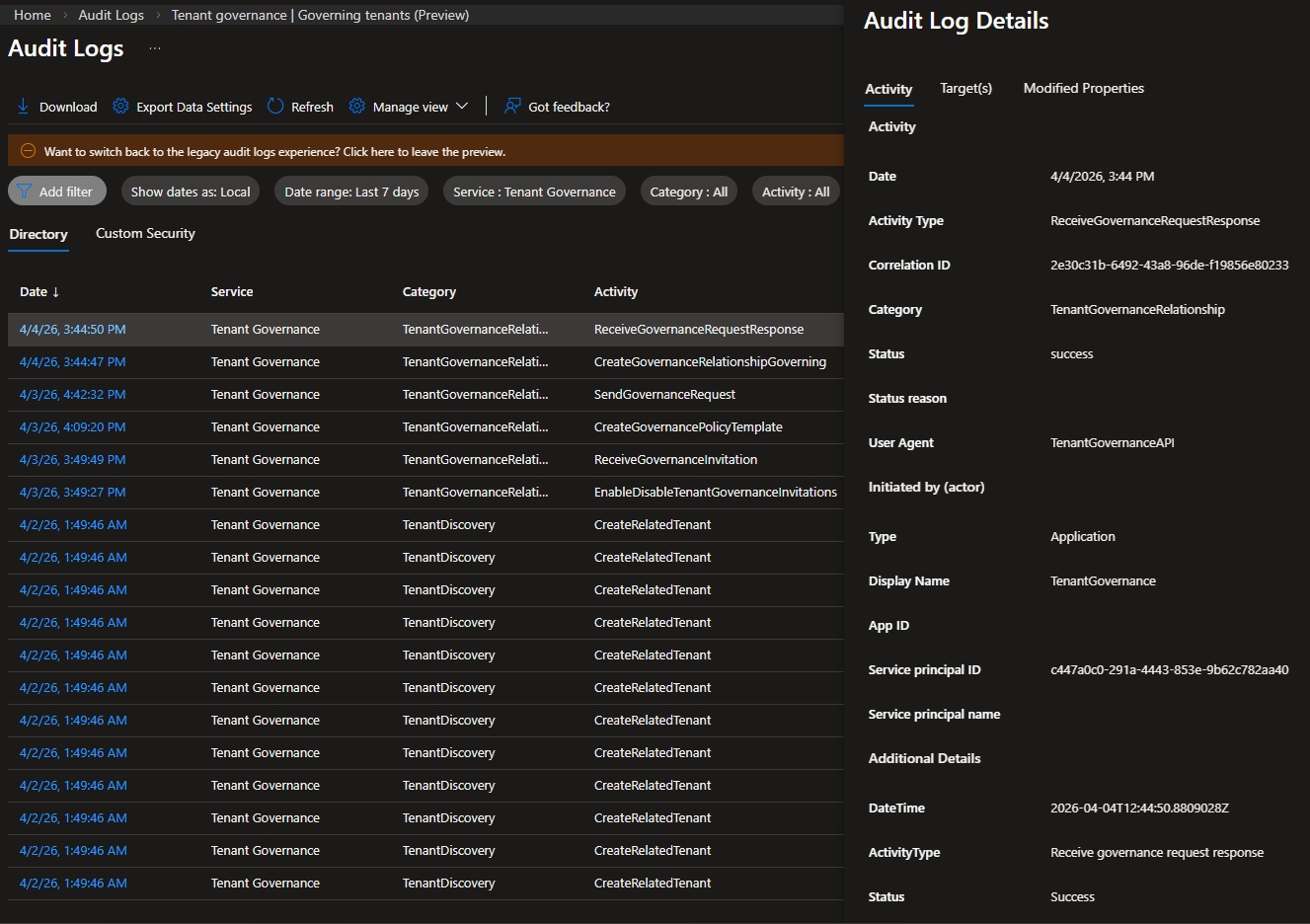
Unlike the UTCM preview, Tenant Governance preview features proper support for auditing and you can find corresponding events under Entra’s Audit log. For best experience, filter the log by Service value of Tenant Governance. On the screenshot below, you can see audit log entries for each of the discovered related tenant, toggling the invitation setting, configuring the default template, and all stages of establishing a governance relationship via the three-step flow.
In summary, Tenant Governance aims to address some of the major pain points of managing multiple Entra/Microsoft 365 tenants. Apart from being able to leverage the UTCM feature set to establish “baselines” for basic or highly critical settings, a robust (albeit a bit noisy) discovery process allows you to bring all your “related” tenants into a single view. Using the three- or two-step flow, you can bring tenants under governance, as well as provision new tenants with the appropriate governance relationship from the get go. Given the impact the product can have on existing environments and the fact that we’re getting the bulk of its functionality practically for free, Tenant Governance is one of the most important releases in recent years, and has a bright future ahead of it!
1 thought on “Introduction to Microsoft Tenant Governance part 2: tenant discovery and creation”