Leverage snapshots for more streamlined experience
Thus far, we covered how you can leverage UTCM to monitor resources within your Microsoft 365 tenant. Given the number of resources supported, creating a set of monitors that cover all the objects and properties you care about can be a daunting task, and one prone to errors. To streamline the process, UTCM offers a way to capture a “snapshot”, or a representation for the current state of a given object, or set of objects, within your organization, which you can then leverage as both an input in new monitor provisioning tasks, and as an artefact that you can store within an external version control system.
To create a snapshot, you need prepare a JSON payload with its displayName, description and the set of resources you want included, for a request against the /admin/configurationManagement/configurationSnapshots/createSnapshot endpoint. Unlike a monitor payload though, you do not need to specify individual resource instance or properties. Think of it as a “bulk export” option, whereas monitors are more targeted. Anyway, here’s an example on how to create a snapshot:
#Create a new snapshot
POST https://graph.microsoft.com/beta/admin/configurationManagement/configurationSnapshots/createSnapshot
{
    "displayName": "Snapshot for Entra CA policies",
    "description": "This is a snapshot created via the Graph API that exports the Entra ID Conditional access policies",
    "resources": [
        "microsoft.entra.conditionalAccessPolicy"
    ]
}
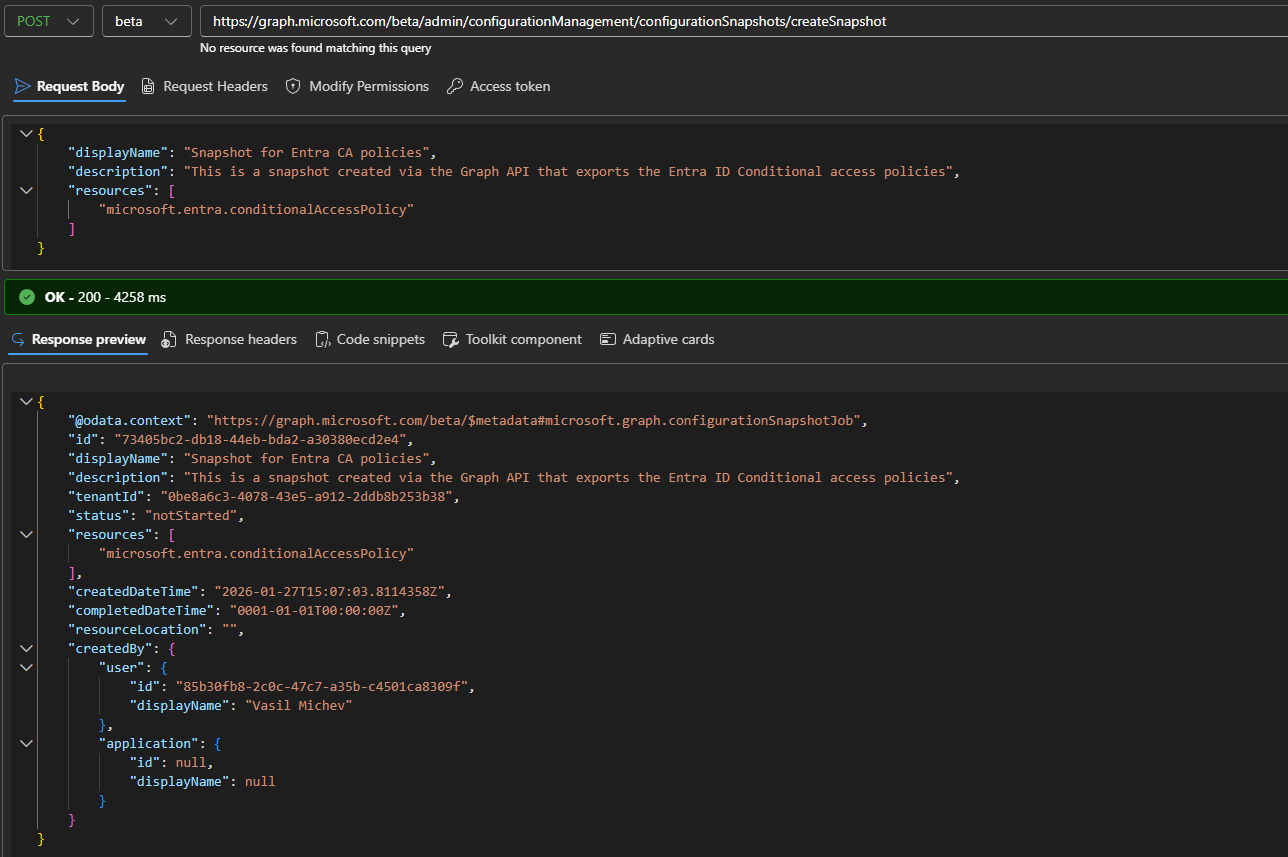
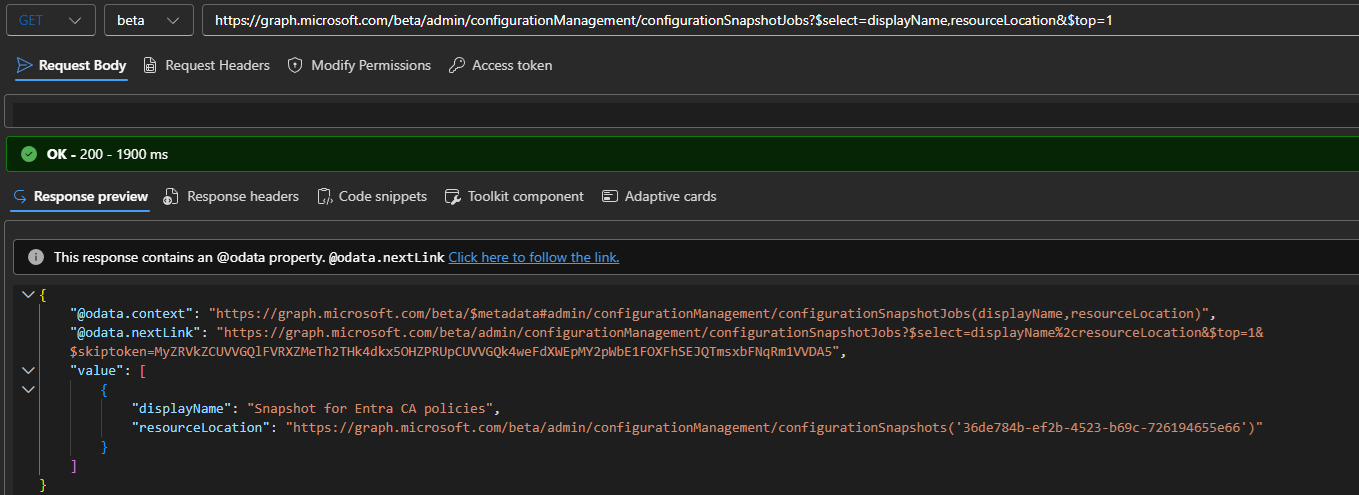
Do note that there is no endpoint to LIST all snapshot objects. The task is instead delegated to the configurationSnapshotJob endpoint and the methods therein. Each snapshot creation operation will result in a job being created and executed (once!), with a corresponding artefact generated on success. The resourceLocation property gives you the URI where you can fetch the resulting artefact. Technically, it is the GET snapshot URI.
Working with the configurationSnapshotJobs endpoint is pretty straightforward. The example below shows how to use the $select and $top operators, with $filter supported as well. Consult the official documentation for more details if needed.
#Get the latest run snapshot and its artefact location
GET https://graph.microsoft.com/beta/admin/configurationManagement/configurationSnapshotJobs?$select=displayName,resourceLocation&$top=1
 As snapshots create a point-in-time representation of a given resource, the generated artefacts are kept for 7 days only, after which they are removed. It is the responsibility of the customer to export/store the snapshot for future use, perhaps by using a version control system. Here’s an example on how to do the export:
GET https://graph.microsoft.com/beta/admin/configurationManagement/configurationSnapshots('36de784b-ef2b-4523-b69c-726194655e66')
In our scenario, the resulting JSON will contain the full set of Conditional access policies configured within the tenant, along with their properties, which is quite lengthy as you might expect, so we will not be showing the output here. That output can be used as an input for a monitor creation payload. Instead of having to populate the baseline object manually, we can copy the snapshot output. To illustrate this, here’s how a snapshot for Entra’s authorization policy resource looks like:
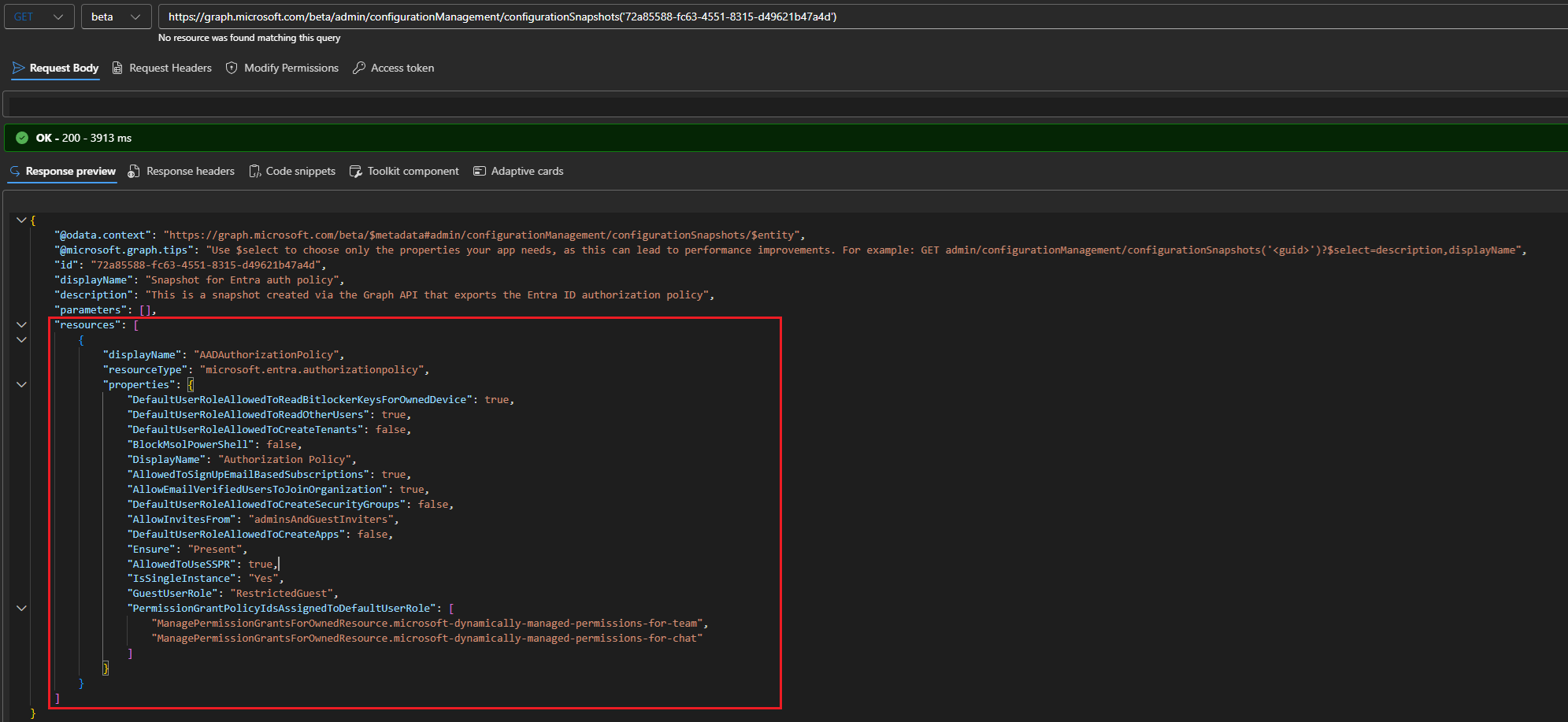
Compare this to the payload we used for our monitor creation task in the previous section. You’ll notice that the resources section closely resembles the baseline we used above. The main difference is that since the snapshot behaves akin to a bulk retrieval, it will fetch all instances and properties of a given resource. In contrast, when providing a baseline for our monitor, we can granularly specify what objects and properties to monitor.
You might also notice that the names of properties can differ from their “expected” values. For example, there is no property named DefaultUserRoleAllowedToReadOtherUsers in the definition of the authorization policy resource. This is indeed just a representation of the allowedToReadOtherUsers property found within the defaultUserRolePermissions resource. You can also encounter some internal properties, such as the Ensure one, or IsSingleInstance (for Entra resources), both used by UTCM but otherwise not found within the original resource’s definition.
In other words, it’s strongly recommended to leverage the snapshot functionality for creating your monitors, instead of doing that from scratch.
Detecting configuration drift
Thus far, we’ve seen how we can setup UTCM to monitor Microsoft 365 resources. We have also seen that the monitor result object will contain information about any deviations from the desired state we declared within the monitor’s baseline, via the driftsCount property. To see exactly which objects/properties are causing the drift, we can leverage the configurationDrift resource, which supports LIST and GET methods.
The output of said methods gives us details as to which monitor, resource type and baseline resulted in the drift detection. As for the actual drifted values, this information is contained within the driftedProperty resource, in the form of key-value pairs with the name of the property (propertyName), its detected (currentValue) and expected (desiredValue) value. Here’s an example:
#Fetch the latest detected drift
GET https://graph.microsoft.com/beta/admin/configurationManagement/configurationDrifts?$top=1&$select=driftedProperties

From the output above, we can determine which exact property values for our monitored authorization policy resource don’t currently match their desired state. UTCM does not currently offer any methods to remediate drifts, but such functionality is high up on the team’s backlog. For now, you can make any necessary changes outside of the tool and wait for the next run of the monitor to confirm that your tenant’s configuration now matches the desired state.
Combined with the snapshot functionality, this allows UTCM to enable a plethora of scenarios. Some of the more interesting among them revolve around “extracting” the configuration of a tenant, then using it as a “baseline” to one or more additional tenants. A scenario that will certainly be of interest to any company dealing with multiple tenancies, as well as partners that administer them on behalf of customers. Add automated remediation in the mix, and you get a must have product.
Limitations and troubleshooting
Now, as this is still a preview product, some limits and rough edges are to be expected. As mentioned already, UTCM doesn’t cover every Microsoft 365 resource, or workload for that matter. While we can expect things to improve in this regard, there is an underlying dependence on the various product groups within Microsoft, and we all know how often, or efficiently, these communicate with each other.
While Microsoft hasn’t put any information as to the cost/pricing of UTCM, they are enforcing licensing checks for any of the API endpoints. This means you will need a Microsoft 365 E3 or Entra ID Premium P1 plans to work with the public preview.
There are also some throttling/resource consumption limits you need to be aware of. For monitor objects, each tenant will be allowed to create up to 30. They will all run on a predefined schedule, which currently cannot be customized. A monitor can’t be run on demand either, you have to wait for the next scheduled time. Across all monitors, up to 800 resources per day can be covered.
Snapshots can be used to export maximum of 20k resources per month and you can have up to 12 of them active at any given time. The artefact generated by a snapshot run will be available for a maximum of 7 days, after which it will be deleted. There is no plan to offer any version control within the tool itself, and your snapshots should be exported/stored within an external tool instead, such as Azure DevOps or GitHub.
Given the vast number of controls currently exposed by various Microsoft 365 workloads, the limits mentioned above might prove to be an issue for some organization. Remember though that this is still a preview and a free one at that. Microsoft will likely adjust the limits going forward, ensuring UTCM can meet the needs of larger customers, while being financially viable and without impacting the overall performance of the service.
Apart from limits, there are some annoyances you might run into when playing with the UTCM API. Some methods might be generating an @odata.nextlink facet which is unnecessary and leads to an empty “page”. The status codes returned by errors might not match the expected behavior. More importantly, no validation is performed when creating monitors and snapshot objects as to whether the UTCM service principal has sufficient permissions to access the requested resources. In such cases, the monitor or snapshot job will fail.
Each job object stores information about any errors encountered, though the corresponding errorDetails property will not be returned by default. Instead, you need to specifically request it via the $select operator. The example below illustrates this for a monitor job instance failing due to insufficient permissions:
#Fetch error details for a monitor run

GET https://graph.microsoft.com/beta/admin/configurationManagement/configurationMonitoringResults/470432ef-6e37-4517-95ff-be478904457e?$select=errorDetails
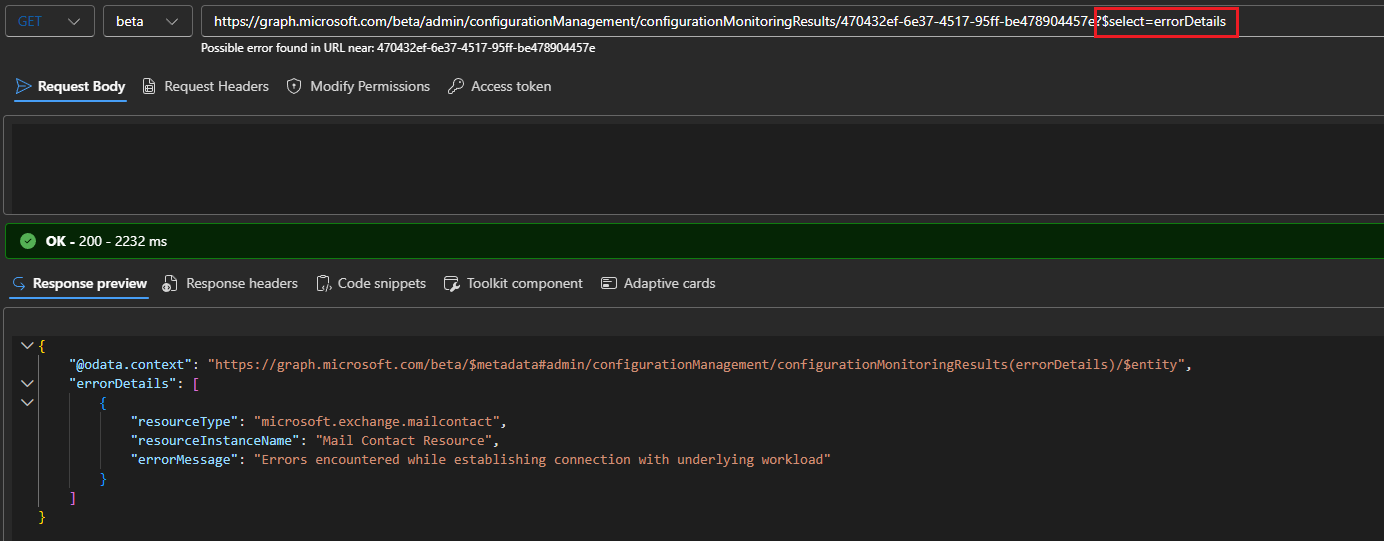
Similarly, property value validation can sometimes escape through the object creation phase, only to result in monitor failure down the line. As with permission-related issues, examine the errorDetails data for the root cause, and address it as needed.
Interestingly, UTCM enforces an uniqueness constraint for displayName across its resources. You must keep this in mind when provisioning new monitors or snapshots, as duplicate name values will result in errors.
Lastly, the tool does not currently generate any audit log trail. While this is certainly disappointing, it’s simply a side effect of the prioritization Microsoft had to do for hitting the public preview milestone. Rest assured that the good folks that drive the product are well aware of the importance of auditing, and the tool will not launch without such.
Summary
In summary, we explored the public preview of the UTCM tool, aka the supported version of Microsoft 365 DSC. While there is currently no flashy UI you can play with, the tool should still provoke interest in any customer that wants to stay on top of their tenant’s configuration. In fact, API-first approach is exactly what you need for a fully automated configuration-as-code product, and while UTCM still has some way to go before we can call it that, the promise is there.
There’s a lengthy roadmap which incorporates the UTCM bits into a fully fledged, UI-based product to automate governance of multiple tenants that Microsoft looks to release this year… but we are not yet allowed to talk about this publicly. For now, rest assured that Microsoft is quite seriously committed to building a product on top of UTCM, as well as having it serve as a platform for customers and partners to build upon.
One thing needs to be made clear though – this is not a backup product. While UTCM does allow you to extract a snapshot of the current state of given resource, and you are more than welcome to keep this as a point-in-time artefact, using this as the basis for potential recovery operations will not always be possible. Putting aside that the tool does not currently perform any “write” operations against resources, you will not be able to recover objects in their exact original state, with preserved GUID and relationships. Set your expectations right!
Lastly, for customers that have been using Microsoft 365 DSC, there is some guidance on the migration path towards UTCM. There is no full parity between the two just yet though.
3 thoughts on “Meet the supported version of Microsoft 365 DSC: UTCM quick look part 2”