It’s been a while since we covered Access reviews and in all fairness, not much has changed with the functionality lately. The Ignite 2025 conference did bring us the announcement of user-centric access reviews, a new model where instead of creating access reviews based on the resource type, you work on the catalog level and all resources included therein. Said feature, also known as catalog access reviews, is now available in public preview. Let’s take a look as to how it all works.
As hinted by the name, this new model relies on the integration with Entra ID Governance. While you can still create Access Reviews using the old per-resource model and without the need for additional licensing, the user-centric ones depend on the catalog construct within Entra ID Governance, hence the need for a Microsoft Entra ID Governance or Microsoft Entra Suite subscription. In fact, the “user-centric” moniker can be considered misleading, as nowhere in the process you do point to any user directly… but let’s dive in into the details.
Working with Catalog access reviews
To refresh your memory on catalogs, they are basically a container for resources. Of the list of currently supported resources, only Groups and Teams (Microsoft 365 Groups and security groups, with no support for mail-enabled security groups or Distribution groups) and Applications are currently supported for catalog access reviews. Other resource types added to a catalog will not be considered for the purposes of the review process. One major improvement needs to be mentioned here, namely the functionality to add disconnected applications to the catalog, also in preview. More on that later.
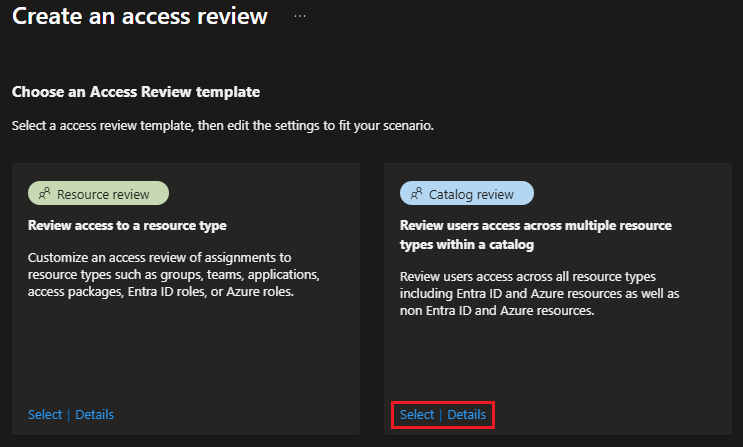
After adding the desired resources to the default or custom created catalog, head over to the Access Reviews page. Hitting the New access review button now presents a selection between two templates: one corresponding to “standard” resource -based Access reviews and another one that enabled catalog-based reviews, as shown on the screenshot below:
The process of creating a Catalog review largely uses the same steps. Start by specifying the Review name, and make sure to also add a proper Description. As Catalog reviews cover all (supported) resources in a given catalog (to be selected on the next screen), the scoping controls exposed on the initial screen allow you to scope the set of users to which the review will be applied. The currently supported options for the Users in Scope control are: All Users, All users excluding guests, and Guest Users. Despite what the Details pane tells you, you cannot scope a Catalog review to user by department, or similar.
Next, under the Resources screen, you can point to the catalog containing the resources to be reviewed via the Select Catalog control. No additional scoping is possible and all supported resources within the selected Catalog will be included as part of the access review. If needed, you can use the + Create new catalog button to provision a new Catalog.
The remaining steps mirror those for “standard” access reviews: select the set of Reviewers, which for Catalog reviews can be either the resource owner(s) or the manager of the user; configure the Stages and Schedule for the review instance; configure the Reviewer experience; configure the Upon completion settings. Lastly, Review the selections made, then hit the Create button to provision the catalog review.
Newly created (and existing) Catalog reviews can be found under the Catalog reviews – multi-resource tab of the Access Reviews page. Compared to the “standard” Access reviews page, a different set of columns is exposed in the list view: Name, Identities in scope, Resource Type, Catalog Name, Review start, and Status. Clicking any Catalog review entry will take you to its Overview page, as shown below:
 Therein, you can review the configuration, though you might be surprised to find no mention of the Catalog name or any list of the resources found therein. You can monitor the progress across any instances listed under Current and past reviews, but when it comes to Settings, you will not be able to make any changes.
As the review starts progressing, designated reviewers will start receiving notification emails, pointing them to the My access page. For some reason using the direct access link from the email always resulted in blank page in my tests, though accessing the reviewer experience via My Access > Access reviews > Multi-resource (preview) and selecting the access review in question worked as expected.

While the reviewer experience is fairly straightforward, the level of detail is lacking here, too. Objects are still designated via their display name only, which can cause confusion when you have multiple groups or applications using the same identifier. The Permission column also lacks clarity, as group ownership is not indicated, and when it comes to applications, it will only reveal the app role assigned, without any indication of the Graph API permissions the user has consented to for a given app.

Much like the case for “standard” reviews, there is no way to force the selected decision/action to be executed, instead those are automatically applied one the review end date is reached. As an admin, you can monitor the overall progress for a given access review instance via the Results page of the corresponding instance, after you select it under Current and past reviews. Another way to achieve this is to check out the Audit trail, which will contain a record of every action taken by the reviewers.
As mentioned above, only certain resource types are currently supported for Catalog access reviews, so even if you include an Entra ID role or Sites in your catalog, such entries will be ignored. In addition, for application access only assigned App roles are considered, not any delegate permission grants. For Groups. the user must be a member. Ownership of a given group can not be revoked, but denying the review will result in the membership of the user being removed, leaving the group in broken (not supported) state. We cannot blame Catalog access reviews for these shortcomings though, as they are inherited from the “old” feature stack.
Graph API support
Next, let’s see who we can leverage the Graph API to work with Catalog access reviews. Turns out the official documentation does not give you the full details, so as usual we had to resort to some network traces to get them. The culprit seems to be the x-accessreviews-version header, which must be included within the request. Without it, only “standard” access review objects will be returned. So make sure to add said header and set its value to vnext, as shown below:
GET https://graph.microsoft.com/beta/identityGovernance/accessReviews/definitions
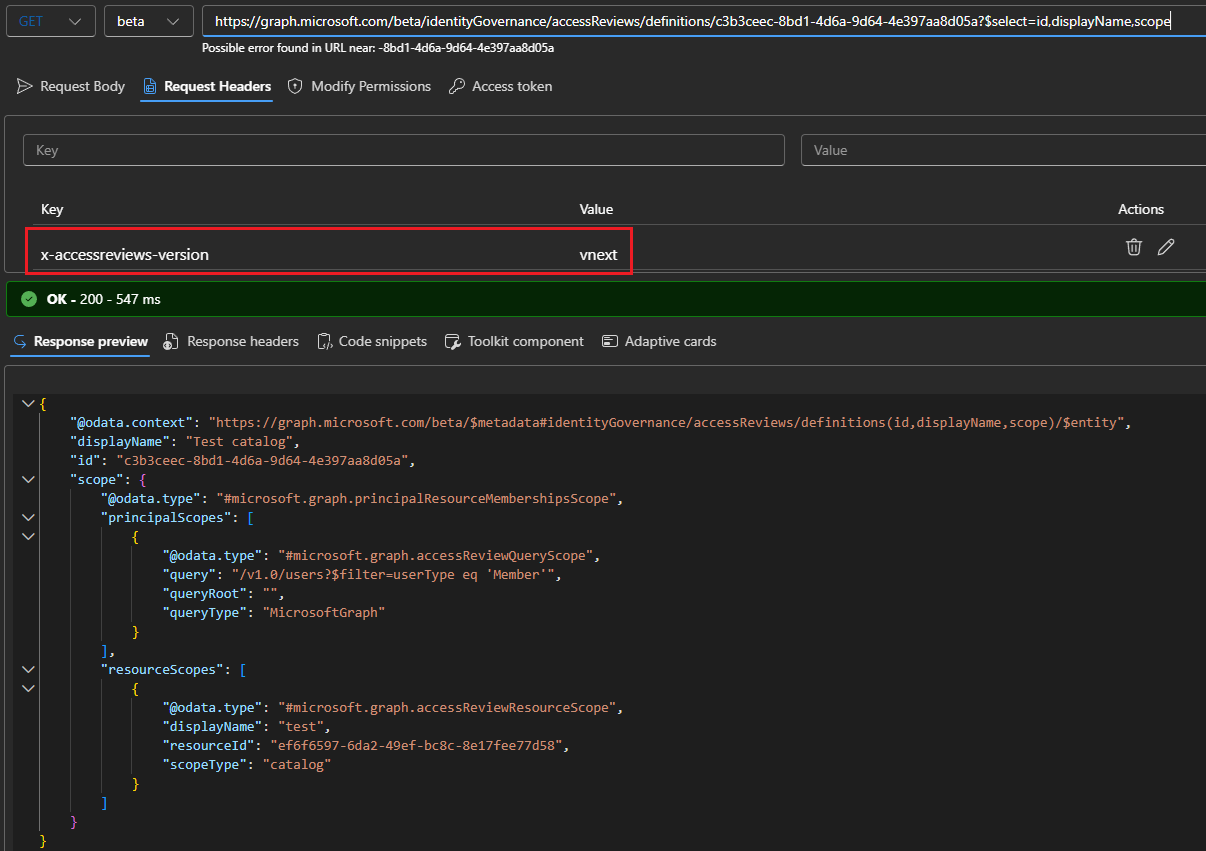
As can be seen from the screenshot above, the main difference with a “standard” access review object is the scope value, and more specifically the resourceScopes element with a @odata.type of #microsoft.graph.accessReviewResourceScope pointing to a catalog object.
Similarly, we can query the Graph API for catalog access review instance objects, or review any decision made:
#Fetch all instances for a given review
GET https://graph.microsoft.com/beta/identityGovernance/accessReviews/definitions/c3b3ceec-8bd1-4d6a-9d64-4e397aa8d05a/instances

#Get reviewer's decisions
GET https://graph.microsoft.com/beta/identityGovernance/accessReviews/definitions/c3b3ceec-8bd1-4d6a-9d64-4e397aa8d05a/instances/542947d2-41c4-4fdf-a3de-bdefd135d8b7/decisions
As above, don’t forget to add the x-accessreviews-version header with value of vnext! Other than that, all the “standard” endpoints can be leveraged, so refer to the official documentation for more details and examples.
Adding custom resources
The last thing we want to cover is the functionality to include custom data provided resources in your catalog access reviews, which is another preview functionality. Currently, you can only include “disconnected” application objects, or to be precise, a representation of the user’s access within such an application. As the name suggests the application object itself doesn’t need to be provisioned in the tenant. Instead, you provide the “access data”, which will be surfaced as part of the review process.
To enable this you’ll need to first add the custom resource within your catalog, done by hitting the Custom Data Provided Resource button under the Add resources page. All you need to do at this step is to provide a Name and Description for the resource, as you are basically provisioning a placeholder. We add the “substance” later, as part of the review process. In a sense, this is a “bring your own data” model for Access reviews.
When you create a Catalog access review for the catalog in question next time, you will be given two hours to present the set of “access data” to be included in the review process. If you fail to do so, the custom resource will be ignored, much like what happens for groups or applications without any assigned users. Similarly, only users whose IDs are found as part of the data uploaded via the CSV file will be surfaced for the review experience.
To ensure your custom resource will be processed, you need to provide the access data in the form of a CSV file. First, get the ID of the Access review object, as well as the ID of the current Access review instance object, as you need to provide those as part of the process. Next, download the sample CSV file and populate it with the data to be reviewed. You might notice that no reference to the disconnected application object ID is found anywhere in the file. Instead, each row in the CSV represents a “permission” entry for the app, referencing the user and the level of access, for the given app as referenced by the name of the custom resource.
If you want to review access to multiple app, repeat the process by provisioning a separate Custom Data Provided Resource for each app, then uploading the corresponding CSV with its “access data”. Additional details and screenshots can be found in the official documentation. Here, we will only show how the experience looks like on the reviewer side of things (after the two hours wait, that is):
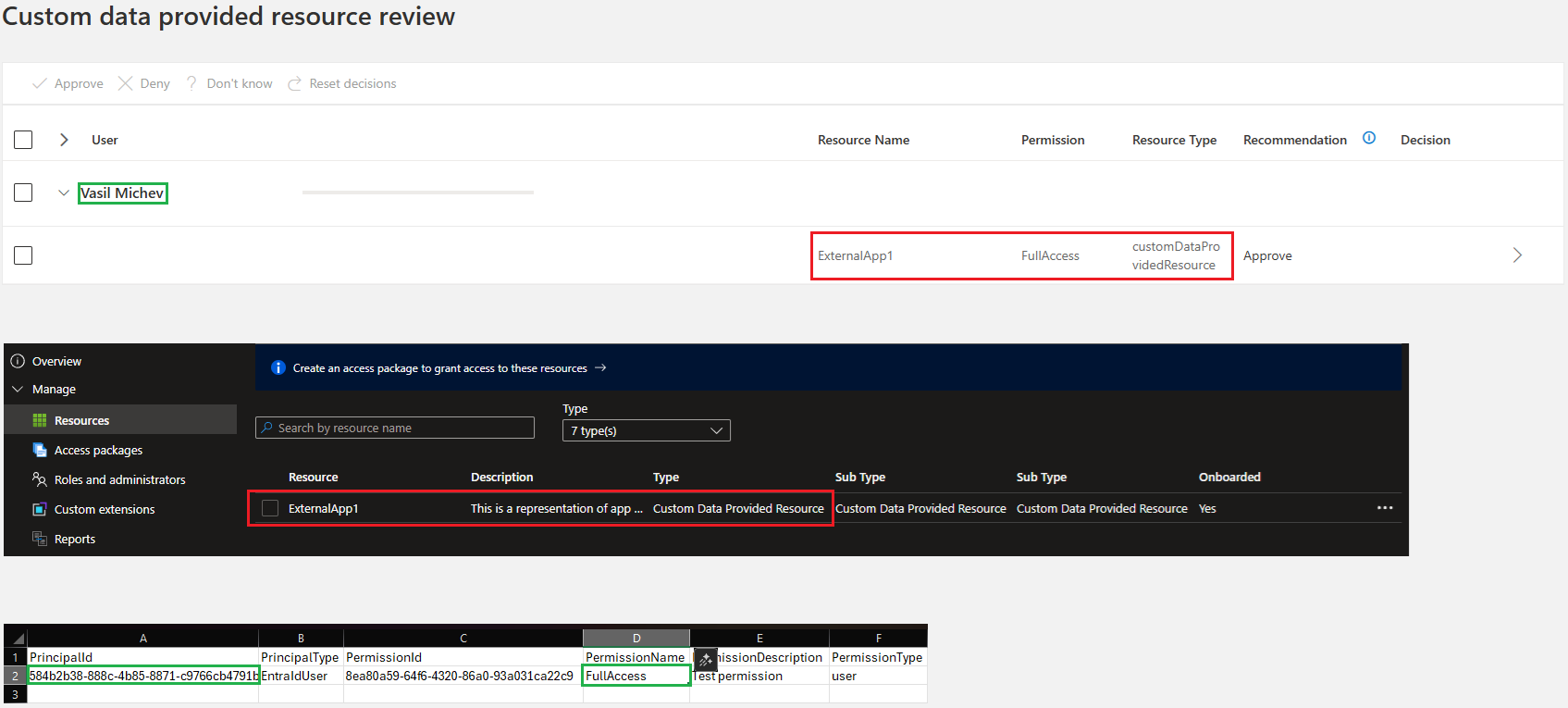
The composite screenshot above shows how the different pieces fall together. Reviewers using My Access portal (top) will see the disconnected application referenced via the name under which the matching custom data provided resource was added to the Catalog (middle), whereas the permission definition and the users in scope come from the uploaded CSV (bottom).
As far as applying the results of the access review goes, this is all your responsibility. Remember, we are talking about access to applications that do not currently have a representation within Entra ID, so there is no way for Entra to take action on any decisions made as part of the review process. Instead, you can use the Graph API to fetch the decision items, then whichever API your disconnected application uses to sanction the corresponding result therein, and lastly, writeback the status back to the Graph API’s object representing the review. Refer to the official documentation for more details.
One annoying part of the process of working with access reviews for disconnected applications is that no indication is given within the catalog resource list as to whether you have already uploaded the access data for said resource. Perhaps Microsoft will address this for the GA release of the feature… we shall have to wait and see.
Closing words
In summary, we took a quick look at two new Access reviews features. The user-centric access reviews, also known as Catalog access reviews, allow you to cover multiple resources and resource types in a single review. Custom Data Provided Resources further extend on this, allowing you to review access data for “disconnected applications”, or in general every resource which allows for user access data to be represented in the supported format. Both features have a dependence on catalog constructs and thus are only available with a Microsoft Entra ID Governance or Microsoft Entra Suite SKUs. While it’s unlikely that any tenant will procure such SKUs just for said features, they are regardless a nice improvement to an otherwise often neglected functionality, which deserves a bit more attention.
1 thought on “Catalog access reviews in Entra ID Governance”