Microsoft has a long history of releasing products and features without providing adequate (or any) governance controls, and if you thought that things would be different in the “agentic” era… bless your soul. As usual, we have been bombarded with a plethora of marketing and sales pitches, combined with some FOMO messaging, while brushing off any legitimate concerns from customers. Things are finally getting to a better place with the release of Agent 365, which promises to “deploy, govern, and manage all your agents at scale“, among other things.
Obviously, the marketing folks at Microsoft have a different understanding of what “at scale” means, considering the product launched with only a UI and no supported method to leverage the underlying APIs. The Agent and app Package Management API has been listed as available since last Ignite, but any attempt to use them resulted in an error. Now, finally, a working set of API endpoints has been released under the /beta channel, allowing to enumerate and manage agents within your tenant. Let’s take a look.
First, permissions. Despite what the current documentation says, both delegate and application permissions are supported for the API. The latter is of course much preferred when you’re interested in fully automated solutions and managing agents at scale, so yay. To use any of the “read” methods, you would require the CopilotPackages.Read.All scope, whereas any of the “write” operations need the CopilotPackages.ReadWrite.All one.
Sadly, the good news end here. Application permissions currently only seem to work for the LIST method, and even the GET one throws and error (424 Failed Dependency) when attempted in the app context. And while the official documentation has been updated to list methods such as block, unblock or reassign, NONE of them are currently functional. So, in effect, all we have to work with is some basic read-only methods.
Next, you need to understand that the API covers more than just agents, as its name suggests. In fact, support for agents has likely been an afterthought, as they are not returned by default. Instead, you have to specifically request them to be returned, by adding a filter to your query. I wish the documentation made that clearer. Anyway, to list all the agents, use the following:
GET https://graph.microsoft.com/beta/copilot/admin/catalog/packages?$filter=supportedHosts/any(x:x eq 'Copilot')
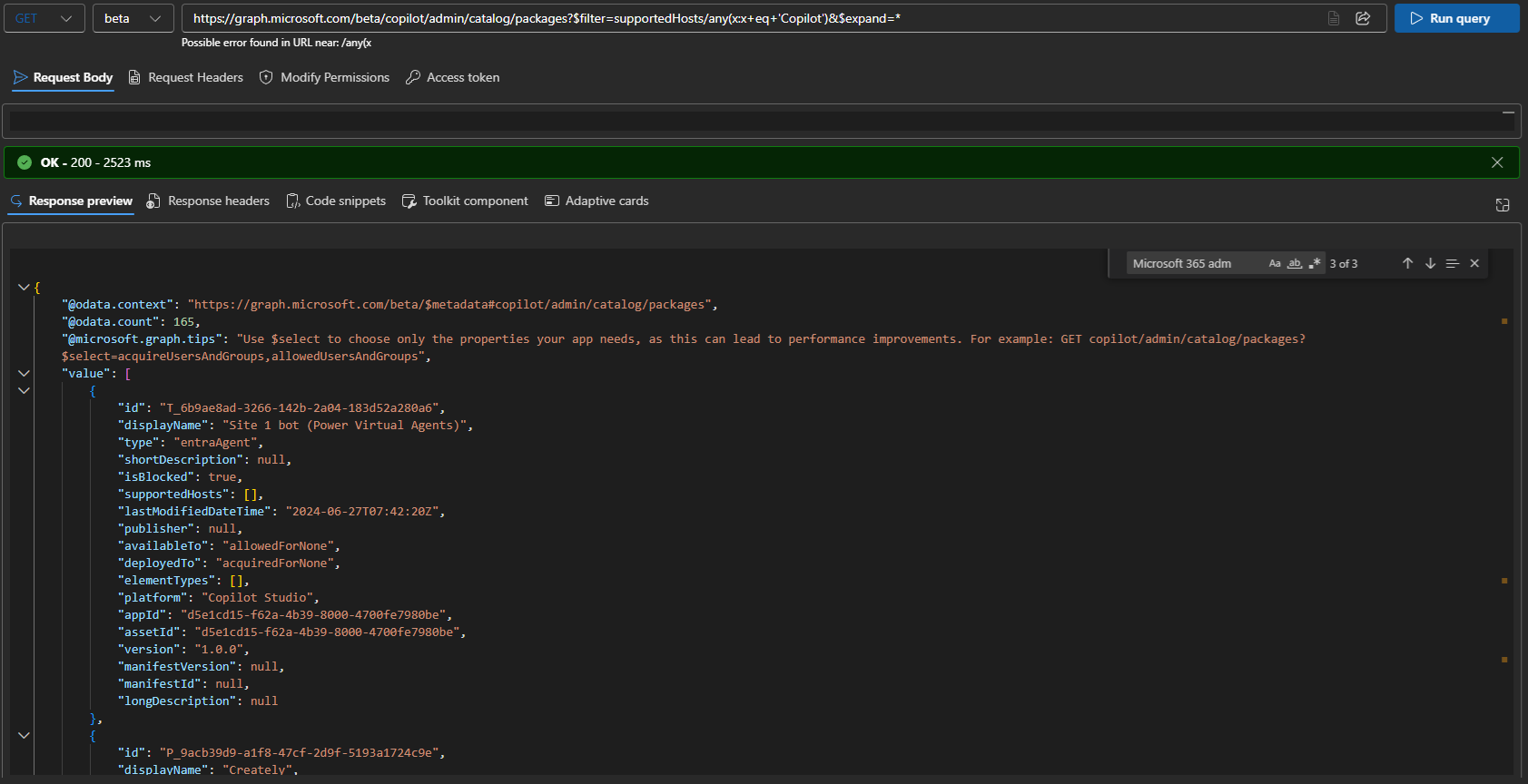
If you compare the results from the above query with what the UI shows, you might notice a slight discrepancy. In my case, a total of 165 agents were returned via the API call, whereas the Agent 365 UI lists their number as 163, plus one blocked, 164. If you export the UI list to CSV file, or bother to count the actual entries returned, you will find the number do match. It’s sad that the engineers responsible for the product supposed to secure your AI implementation do not understand the difference between first and zeroed element in an array 🙂
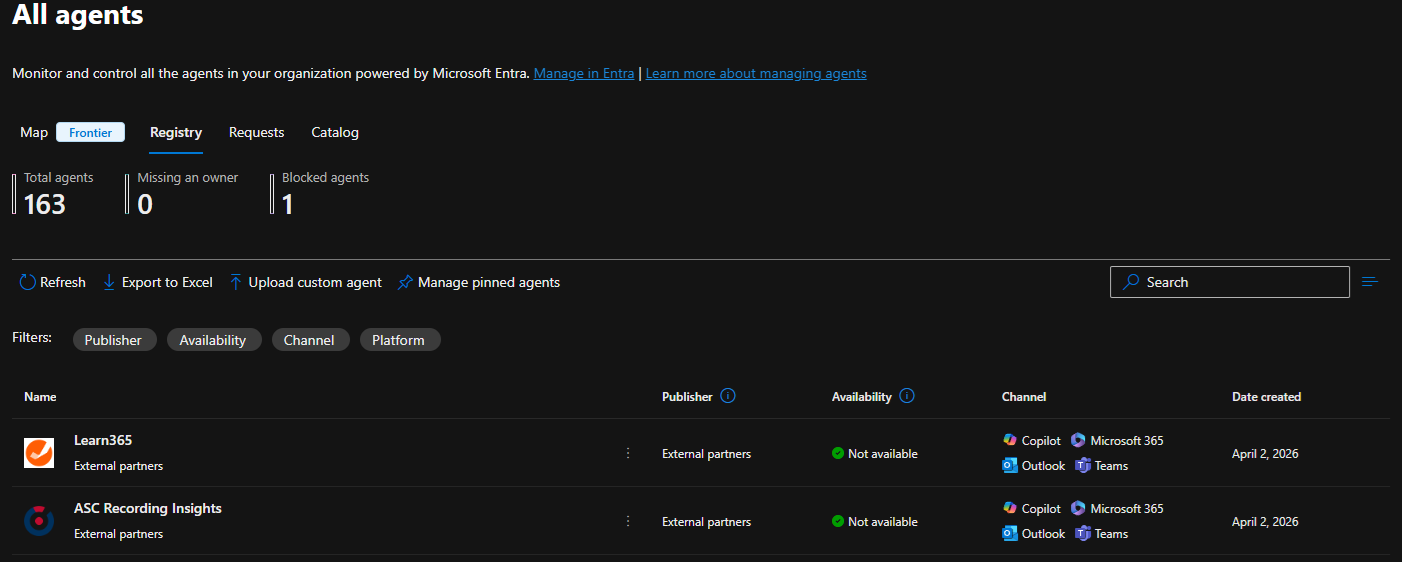 Joking aside, if we compare both list, we will also notice the level of detail exposed varies between the two. For example, the Sensitivity property is not exposed via the API. More importantly, the UI allows you to get details as to what permissions are requested by (or granted to) the agent, some usage and billing details, and so on. For agents that have matching Entra ID service principal provisioned in your tenant, you can perform additional queries to get the permission details. However you cannot do this for any random agent, so having a property with the corresponding permission sets would be nice. Hopefully, future iterations of the API will address these shortcomings.
To get details on specific agent, use a GET request against its ID:
GET https://graph.microsoft.com/beta/copilot/admin/catalog/packages/P_13001d9b-2af4-bd2f-5458-ffa544bc62b7
The response will closely match the one from the LIST method (shown above), with one additional property exposed, namely the elementDetails one. This usually gives you the set of prompts supported by the agent, such as “Show me all recordings from today” for the currently selected one.
Among the other properties worth mentioning, we are mostly interested in thigs like isBlocked (the on/off switch), who the publisher is, and most importantly, the set of users and groups that are allowed to access this agent, or have already added it. Those are controlled by the availableTo and allowedUsersAndGroups properties for the former, and deployedTo and acquireUsersAndGroups for the latter scenarios, accordingly. Both availableTo and deployedTo are enums, with the following values accepted:
- allowedForNone or acquiredForNone – no users can access or deploy the agent.
- allowedForAll or acquiredForAll – all users can access or deploy the agent.
- allowedForSome or acquiredForSome – specific set of users and groups can access or deploy the agent.
For the last case, the set of principals to allow or deploy the agent for is configured as part of the allowedUsersAndGroups and acquireUsersAndGroups lists, both of packageAccessEntry type. It might sound a bit convoluted, so here’s an example:
#Get package details via Graph API
GET https://graph.microsoft.com/beta/copilot/admin/catalog/packages/P_e3d64609-7a28-6de6-3093-402c20bb96ce?$select=id,allowedUsersAndGroups,availableTo

#Get package details via Graph PowerShell
$res = Invoke-MgGraphRequest -Method Get -Uri "https://graph.microsoft.com/beta/copilot/admin/catalog/packages/P_e3d64609-7a28-6de6-3093-402c20bb96ce?`$select=id,allowedUsersAndGroups,availableTo"

$res | select id,displayName,allowedUsersAndGroups,availableTo

id                                     displayName   allowedUsersAndGroups                                                        availableTo
--                                     -----------   ---------------------                                                        -----------
P_e3d64609-7a28-6de6-3093-402c20bb96ce Writing Coach {e0d7442c-8cd8-4e65-8ede-ec9887816677, ecdbc965-b30b-47d7-8dbe-904fd286aa46} allowedForSome
 Do note that the GET/LIST methods do not currently support the $select operator, so the output above has been manually adjusted. In addition the LIST method will not populate values for the allowedUsersAndGroups or acquireUsersAndGroups properties, you have to use individual GET requests instead. Lastly, trying the GET method via application context seems to throw a (424) Failed Dependency error currently.
And unfortunately, this is there is to cover for the API at this point. As mentioned above, while the current documentation is happy to list additional methods and operations, none of them work. Instead, you will be presented with a generic error, and you have to wait until Microsoft fully releases said methods. Hopefully, it won’t take another six months.
Once this happens, we will be able to explore some basic scenarios, such as managing assignments for agents, or blocking the ones we might consider inappropriate for use in the organization. While the availability of per-agent methods will certainly improve the overall manageability picture, there is currently no word as to support for the dozens of configuration settings, exposed within the UI. Oh well, I suppose I’ll have an excuse to write another article on the subject.
In summary, the first iteration of the endpoints and methods to manage agents is available on the Graph API. Manage sadly is an overstatement, given the current state of the APIs, but nevertheless, we at least have some visibility into agents. While reporting on the available agents, their assignments and usage is still an important task, the API does not yet allow us to take any action with regards to agent management, which is a shame.
Nice erticle, I have one issue though 🙂 I’ve consented to the CopilotPackages.Read.All permission but still getting Forbidden when trying to list all packages (under my account which is GA). Any tips?
I believe this is still only available to tenants in the Frontier program, public access should follow shortly.