As announced as part of message center post MC1459136, Microsoft is in the process of updating the reporting endpoints for use with the .microsoft top level domain. Unlike most of the other admin interfaces (and clients) though, which all will use the cloud.microsoft domain going forward, the reporting endpoints will switch to the core.microsoft domain.
I suppose we should clarify what we mean by “reporting endpoints”. While the report experience in the Microsoft 365 Admin center remains the same, the queries used to fetch the actual report data will be switched to the new set of endpoints. This is all obfuscated by calls to intermediate proxy APIs such as the one shown on the screenshot below, but the bottom line is that the endpoints listed in MC1459136 are what eventually gets hit on the backend.
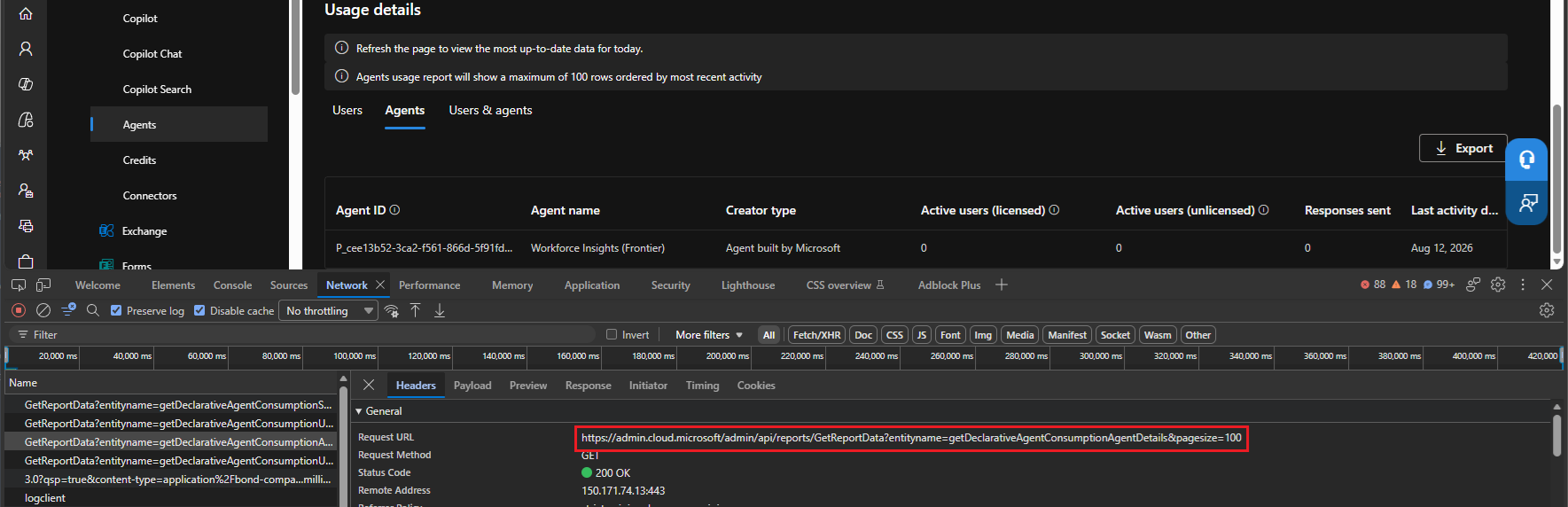 For reports accessed via the browser experience to continue to work as expected, organizations (might) need to prepare their environment. To be clear, Microsoft has NOT announced a cutoff date yet. They are just asking customers to prepare for the eventual move to the new top-level domain. The old endpoints will continue to work and will eventually get redirected to the new ones. Only then a deprecation date will be announced.
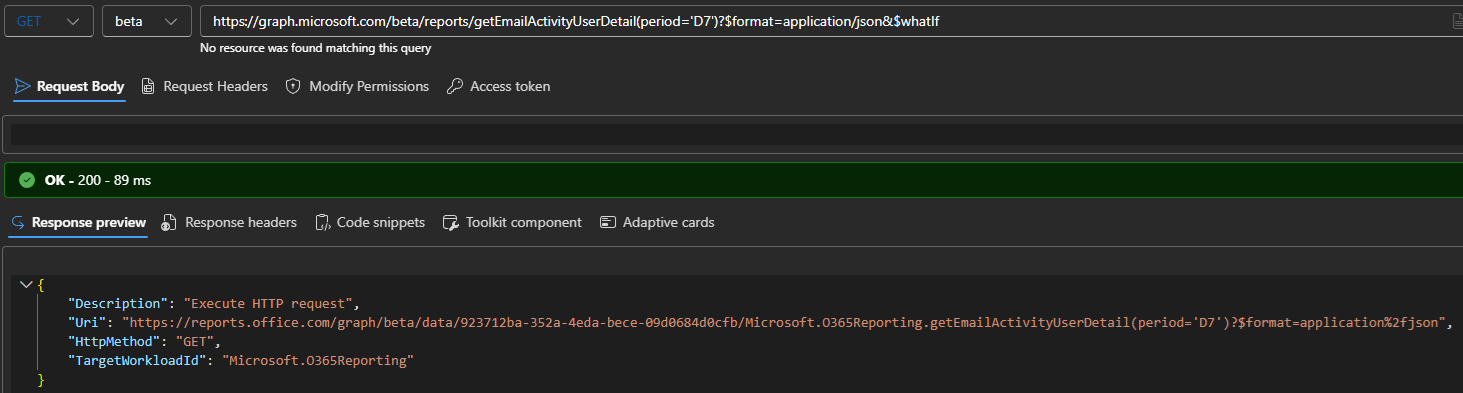
Microsoft has not communicated any impact on the Graph API reporting endpoints, which are also effectively implemented as a proxy (see screenshot below) for the endpoints referenced in MC1459136. The difference with the portal experience is in the way the request is routed. While the former acts as the frontend layer, a customer calling the Graph endpoints will not be affected as this is a service-to-service call which Microsoft handles internally, and the network boundary is only crossed after the report data has been retrieved.
For the sake of completeness, here’s the table representing the upcoming changes:
| Environment | Current domain | New domain |
| Commercial (Worldwide) | reports.office.com | usage-reports.core.microsoft |
| GCC Moderate | reports.office.com (shared with commercial) | gcc.usage-reports.core.microsoft |
| GCC High | reports.office365.us | usage-reports.usgovcloud-core.microsoft |
| DoD | reports.apps.mil | dod.usage-reports.usgovcloud-core.microsoft |
So why am I bothering you with an otherwise mundane change, one that deserves a mention in passing at most? Because the same reports.office.com endpoint can be used to programmatically retrieve not just the reports exposed in the Microsoft 365 Admin center, including ones we do not have a proper Graph API endpoint for, but also some “hidden” datasets. We detailed the process in a previous article, so now lets see how the changes will affect it.
The first thing we need to handle is authentication. The changes do not seem to affect this part of the process, as the resource value remains unchanged (https://reports.office.com/.default). In fact, if you try to replace it with the suggested new values, you end up with an AADSTS500011 error:
AADSTS500011: The resource principal named https://usage-reports.core.microsoft was not found in the tenant named xxxxxxxx-xxxx-xxxx-xxxx-xxxxxxxxxxxx. This can happen if the application has not been installed
by the administrator of the tenant or consented to by any user in the tenant. You might have sent your authentication request to the wrong tenant.
Whether Microsoft updates the resource/scope value in the future remains unclear, but for the time being, you must still use the “old” value. In other words, the authentication block remains virtually unchanged:
$appId = "a672d62c-fc7b-4e81-a576-e60dc46e951d" #"Microsoft PowerQuery For Excel" built-in application
$tenantId = "xxxxxxxx-xxxx-xxxx-xxxx-xxxxxxxxxxxx"
$redirectURI = "https://preview.powerbi.com/views/oauthredirect.html"

#Load the MSAL binaries
Add-Type -Path "C:\Program Files\WindowsPowerShell\Modules\MSAL\Microsoft.Identity.Client.dll"

#Get a token for the https://reports.office.com resource
$app2 = [Microsoft.Identity.Client.PublicClientApplicationBuilder]::Create("a672d62c-fc7b-4e81-a576-e60dc46e951d").WithRedirectUri($redirectURI).WithTenantId($tenantId).WithBroker().Build()
$Scopes = New-Object System.Collections.Generic.List[string]
$Scope = "https://reports.office.com/.default"
$Scopes.Add($Scope)
$token = $app2.AcquireTokenInteractive($Scopes).ExecuteAsync().Result

#Set the auth header
$authHeader1 = @{
'Authorization'="Bearer $($token.AccessToken)"
}
Once an access token is obtained for the correct (“old”) resource/audience, we can leverage the new endpoints to fetch report data. For example, the request below uses the updated commercial/worldwide endpoint to fetch the Teams app usage report:
$res = Invoke-RestMethod -Uri "https://usage-reports.core.microsoft/internal/ux/getTeamsAppUsageDetail?pageSize=200&tenantId=xxxxxxxx-xxxx-xxxx-xxxx-xxxxxxxxxxxx&Aggregate=M180" -Headers $authHeader1

$res.value | ft appName,publisher, @{n="Last activity";e={$_.lad}},@{n="# of Users";e={$_.details.userUsingApp}},@{n="# of Teams";e={$_.details.teamUsingApp}}

appName                       publisher             Last activity # of Users # of Teams
-------                       ---------             ------------- ---------- ----------
Excel                         Microsoft Corporation 2026-04-30             1          1
Power BI                      Microsoft Corporation 2026-04-24             1          0
Viva Learning                 Microsoft Corporation 2026-04-24             1          0
Loop                          Microsoft Corporation 2026-04-30             1          0
Forms                         Microsoft Corporation 2026-05-27             1          0
Miro                          Miro                  2026-04-30             1          0
Channel Agent                 Microsoft Corporation 2026-04-30             1          0
Workforce Insights (Frontier) Microsoft Corporation 2026-08-12             1          0
Planner                       Microsoft Corporation 2026-06-08             1          0
Azure DevOps                  Microsoft Corporation 2026-06-18             1          0
Praise                        Microsoft Corporation 2026-06-18             1          1
One place where the new endpoints are not reflected yet is the “regional” host values, as shown by the queries below:
#Get the host value via the old endpoint
$res = Invoke-RestMethod -Uri "https://reports.office.com/private/intraTenantConfig/host?tenantid=xxxxxxxx-xxxx-xxxx-xxxx-xxxxxxxxxxxx" -Headers $authHeader1
$res.host

https://REPORTSWEU.OFFICE.COM

#Get the host value via the old endpoint
$res = Invoke-RestMethod -Uri "https://usage-reports.core.microsoft/private/intraTenantConfig/host?tenantid=xxxxxxxx-xxxx-xxxx-xxxx-xxxxxxxxxxxx" -Headers $authHeader1
$res.host

https://REPORTSWEU.OFFICE.COM
So I suppose for the time being we should be using the “global” values, depending on the cloud you’re in, of course.
As customary, any article that talks about the reporting endpoints also gets a section that lists the currently available dataset, which at the time of writing contains 229 entries, up from 160 in our last article! As you can probably guess, the majority of new additions relate to Copilots and Agents, but also the Teams Queues app, V2 of the Pro Plus usage, Planner, Outlook for Windows report (previously available via the Exchange Admin Center), Search, no name a few.
ActivationsDesktopActivationsSummary
ActivationsMobileActivationsSummary
EmailClientTenant
EmailClientUser
EmailStorageMailbox
EmailStorageMailboxTenant
ExchangeTenantEmailActivity
ExchangeUserEmailActivity
getAgent365AllAgentMetricsData
getAgent365OverviewMetricsData
getAgent365ReportPerAgentData
getAppHealthCurrency
getBrowserActionMetrics
getBrowserUserCounts
getBrowserUserDetail
getBusinessChatAdoptionByDate
getBusinessChatAdoptionByProducts
getConnectorsUsageConnectorsDetail
getConnectorsUsageSummary
getConnectorsUsageUsersConnectorsDetail
getConnectorsUsageUsersDetail
getCopilotActivityUserDetail
getCopilotActivityUserDetailV2
getCopilotActivityUserDetailV3
getCopilotActivityUserDetailV4
getCopilotAdminInsightsByDate
getCopilotAdoptionByDate
getCopilotAdoptionByDateV2
getCopilotAdoptionByProducts
getCopilotAdoptionByProductsV2
getCopilotAgentActiveAgentRL30Metrics
getCopilotAgentActiveUserRL30DailyMetrics
getCopilotAgentActiveUserRL30Metrics
getCopilotAgentActiveUserRL30WoWMetrics
getCopilotAgentActiveUsersLast30Days
getCopilotAgentActivityAgentDetail
getCopilotAgentActivityAgentDetailV2
getCopilotAgentActivityByDate
getCopilotAgentActivityByPeriod
getCopilotAgentAdoptionByDate
getCopilotAgentAdoptionByPeriod
getCopilotAgentUsageByAgent
getCopilotCoworkSatisfactionByDate
getCopilotCoworkUsageByDate
getCopilotCoworkUsageByPeriod
getCopilotCoworkUserDetails
getCopilotEDPActivityUserDetail
getCopilotEDPActivityUserDetailV2
getCopilotEDPActivityUserDetailV3
getCopilotEDPAdoptionByDate
getCopilotEDPAdoptionByDateV2
getCopilotEDPAdoptionByPeriod
getCopilotEDPAdoptionByPeriodV2
getCopilotEDPAdoptionSummaryByPeriod
getCopilotEDPAdoptionSummaryByPeriodV2
getCopilotEDPPromptsSubmittedByDate
getCopilotEDPPromptsSubmittedByPeriod
getCopilotEDPThumbsUpRateByDate
getCopilotLicenseRecommendedUsers
getCopilotPromptsSubmittedByDate
getCopilotPromptsSubmittedByPeriod
getCopilotReadinessActivityUserDetail
getCopilotReadinessActivityUserDetailV2
getCopilotReadinessActivityUserDetailV2AdminInsights
getCopilotTenantTopAgentsByDAU
getCopilotThumbsUpRateByDate
getCreditUsageByBillingPolicy
getDeclarativeAgentConsumptionAgentDetailByAgent
getDeclarativeAgentConsumptionAgentDetails
getDeclarativeAgentConsumptionAgentExportDetails
getDeclarativeAgentConsumptionSummary
getDeclarativeAgentConsumptionUser
getDeclarativeAgentConsumptionUserAgent
getDeclarativeAgentConsumptionUserAgentByAgent
getDeclarativeAgentConsumptionUserAgentExport
getDeclarativeAgentConsumptionUserExport
getDistributionBrowserUserCounts
getFastBusinessChatAdoptionByDate
getFastBusinessChatAdoptionByProducts
getFastCopilotActivityUserDetail
getFastCopilotAdoptionByDate
getFastCopilotAdoptionByProducts
getFastCopilotAgentAdoptionByDate
getFastCopilotAgentAdoptionByPeriod
getFastCopilotChatActivityUserDetail
getFastCopilotChatAdoptionByDate
getFastCopilotChatAdoptionByPeriod
getFastCopilotChatPromptsSubmittedByDate
getFastCopilotChatPromptsSubmittedByPeriod
getFastCopilotPromptsSubmittedByDate
getFastCopilotPromptsSubmittedByPeriod
getFormsProUserActivityCounts
getFormsProUserActivityUserCounts
getFormsProUserActivityUserDetail
getFormsUserActivityCounts
getFormsUserActivityUserCounts
getFormsUserActivityUserDetail
getM365AppPlatformUserCounts
getM365AppUserCounts
getM365AppUserDetail
getMessageConsumptionAgentDetail
getMessageConsumptionBillingPolicyDetail
getMessageConsumptionSummary
getMessageConsumptionUserAgentDetail
getMessageConsumptionUserDetail
getMicrosoft365CopilotUsageUserDetail
getMicrosoft365CopilotUserCountSummary
getMicrosoft365CopilotUserCountTrend
getOutlookWindowsUserCounts
getPlannerActivityUserDetail
getPlannerAdoptionByDate
getPlannertAdoptionByPeriod
getProjectActivityCounts
getProjectActivityUserCounts
getProjectActivityUserDetail
getProjectPlatformUserCounts
getProjectTaskActivityCounts
getProPlusUsagePlatformsUserCounts
getProPlusUsagePlatformsUserCountsV2
getProPlusUsageUserCounts
getProPlusUsageUserCountsV2
getProPlusUsageUserDetail
getProPlusUsageUserDetailV2
getRemoteWorkV2Scores
getScoresSnapshot
getTeamsAIInterpreterTenantActivityByDate
getTeamsAIInterpreterTenantActivityByPeriod
getTeamsAIInterpreterUserDetails
getTeamsAppInstalledCounts
getTeamsAppInstalledUserCounts
getTeamsAppPlatformCounts
getTeamsAppUsageAppCounts
getTeamsAppUsageDetail
getTeamsAppUsageDistributionAppCounts
getTeamsAppUsageDistributionUserCounts
getTeamsAppUsageUserCounts
getTeamsAppUsedCounts
getTeamsAppUsedUserCounts
getTeamsAppUserDetail
getTeamsAppUserPlatformCounts
getTeamsClientVersionUsageUserCounts
getTeamsClientVersionUsageUserDetail
getTeamsPremiumV2ActiveUserCounts
getTeamsPremiumV2ActiveUserDistribution
getTeamsPremiumV2EngagedUserCounts
getTeamsPremiumV2EngagedUserDistribution
getTeamsPremiumV2MeetingCounts
getTeamsPremiumV2MeetingDistribution
getTeamsPremiumV2UserDetail
getTeamsQueuesAppActiveUserCounts
getTeamsQueuesAppActiveUserDistribution
getTeamsQueuesAppUserDetail
getTeamsTeamActivityCounts
getTeamsTeamActivityDetail
getTeamsTeamActivityDistributionCounts
getTeamsTeamCounts
getTenantProductSummary
getTenantProductUsage
getTenantProductUsageTrend
getTenantSearchMetric
getUserSearchMetric
getVisioActivityPremiumUsersCounts
getVisioActivityUsersCounts
getVisioPlatformCounts
getVisioPlatformDistribution
getVisioPlatformPremiumCounts
getVisioPlatformPremiumDistribution
getVisioUserDetail
getVivaGoalsActionDistribution
getVivaGoalsActivityUsersCounts
getVivaGoalsClientCounts
getVivaGoalsDepartmentCounts
getVivaGoalsUserDetail
getVivaLearningActiveUsers
getVivaLearningUserActivities
GroupActivityGroup
GroupActivityGroupV1
GroupActivityTenant
GroupActivityTenantV1
LicenseActivityTenant
LicenseActivityUser
MultiGeoDistributionTenant
MultiGeoDistributionUsersSummary
Office365GroupsActivityActivitySummary
Office365GroupsActivityGroupsSummary
Office365GroupsActivityStorageSummary
OnedriveSiteUsage
OnedriveTenantActivity
OnedriveTenantSiteUsage
OnedriveUserActivity
ReportSettings
SharePointActivityFilesSummary
SharePointActivityUsersSummary
SharepointSiteUsageV1
SharepointTenantActivityV1
SharepointTenantActivityV2
SharepointTenantSiteUsageV1
SharepointUserActivityV1
SharepointUserActivityV2
SkypeTenantActivityOrganizer
SkypeTenantActivityParticipant
SkypeTenantActivityPeerToPeer
SkypeTenantActivitySummary
SkypeTenantClientsUsed
SkypeUserActivityOrganizer
SkypeUserActivityParticipant
SkypeUserActivityPeerToPeer
SkypeUserActivitySummary
SkypeUserClientsUsed
StaffHubTeamsActivity
StaffHubTenantActivity
StaffHubTenantActivitySummary
StaffHubTenantTeamsSummary
TeamsDeviceUsageV1Tenant
TeamsDeviceUsageV1User
TeamsUserActivityV1Tenant
TeamsUserActivityV1User
TeamsUserUsageV1Tenant
TenantProplusActivationState
TenantTiles
UserProplusActivationState
WpiBcrHourlyTenant
WpiBcrTenant
YammerGroupActivityGroup
YammerGroupActivityTenant
YammerTenantActivity
YammerTenantClientsUsed
YammerUserActivity
YammerUserClientsUsed
And since I’m in a generous mood, here are few examples:
- Planner usage detail
$res = Invoke-RestMethod -Uri 'https://usage-reports.core.microsoft/internal/ux/getPlannerActivityUserDetail?tenantId=xxxxxxxx-xxxx-xxxx-xxxx-xxxxxxxxxxxx&Aggregate=M180' -Headers $authHeader1
$res.value | ft userPrincipalName,@{n="Last activity";e={$_.userActivityByPeriod.plannerLastActivityDate}},@{n="# of days active";e={$_.userActivityByPeriod.plannerActiveUsageDays}}

userPrincipalName Last activity # of days active
----------------- ------------- ----------------
vasil@michev.info 2026-07-01                  11
- Outlook for Windows usage
$res = Invoke-RestMethod -Uri 'https://usage-reports.core.microsoft/internal/ux/getOutlookWindowsUserCounts?tenantId=xxxxxxxx-xxxx-xxxx-xxxx-xxxxxxxxxxxx&Aggregate=M30' -Headers $authHeader1
$res.value.outlookWindowsUserCountsByDate | ft

reportDate outlookWindowsAllUp outlookWindowsClassic outlookWindowsNew
---------- ------------------- --------------------- -----------------
2026-08-28                   1                     1                 0
2026-08-27                   1                     1                 0
2026-08-26                   1                     1                 0
2026-08-25                   1                     1                 0
- Agent 365 Overview Metrics
$res = Invoke-RestMethod -Uri 'https://reportsweu.office.com/internal/ux/getAgent365OverviewMetricsData?pageSize=200&tenantId=xxxxxxxx-xxxx-xxxx-xxxx-xxxxxxxxxxxx' -Headers $authHeader1
$res.value | select Total*,Top*

totalActiveUsersRL30 : 1
totalHoursSavedWithAgentsRL30 : 0
totalAgentsWithExceptionsRL30 : 0
totalActiveUsersRL1ByDate : {@{date=2026-08-12; value=1}}
topAgentsByRL30TotalActiveUserCount : {@{agentIdentifier=; agentName=Workforce Insights (Frontier); metricValue=1; rank=1}}
topAgentsByRL30ExceptionRate : {@{agentIdentifier=; agentName=Workforce Insights (Frontier); metricValue=0.0; rank=1}}