Over the years, we’ve talked about Exchange custom attributes, aka CustomAttribute1-15 or extensionAttribute1-15 on multiple occasions, most recently in this article. While they are well known and often used by seasoned administrators, there is still a lot to be desired when it comes to support for them in the Graph API. Therein said attributes are represented as part of the onPremisesExtensionAttributes resource, exposed for user objects (similar extensionAttributes resource exists for device objects). Now, at long last, Microsoft is adding support for group objects, albeit with even more severe limitations. In this article, we will take a look at what’s possible now, and all the scenarios still not addressed.
Fetch custom attributes for group objects
As the Graph API changelog page is not getting regular updates lately, the news was broken out as part of the What’s new in Microsoft Graph page in a very quick and short manner:
Added the onPremisesExtensionAttributes property to the group resource. Use it to access extension attributes 1-15 synchronized from on-premises Active Directory.
Pay attention to the wording, keywords “access” and “synchronized”. But more on these in a bit.
Before we move on to cover specific examples we need to talk permissions. The current version of the documentation doesn’t mention it, but Group.Read.All is required to fetch the values of the corresponding attributes. Directory.Read.All does not work, even though the query will still succeed. You can find comparison between a query with sufficient permissions and one with not sufficient ones below.
To the examples then. Similar to the case for user objects, we must specifically request the onPremisesExtensionAttributes property by means of leveraging the $select operator. Both the GET and LIST methods are supported, that is you can query the property across multiple group objects via a single request. Here are some examples:
#Fetch onPremisesExtensionAttributes for specific group
GET https://graph.microsoft.com/v1.0/groups/57d79eff-ae06-42f4-9ffb-a3a6a6dc6533?$select=id,displayName,onPremisesExtensionAttributes

#Fetch onPremisesExtensionAttributes for all groups
GET https://graph.microsoft.com/v1.0/groups?$select=onPremisesExtensionAttributes
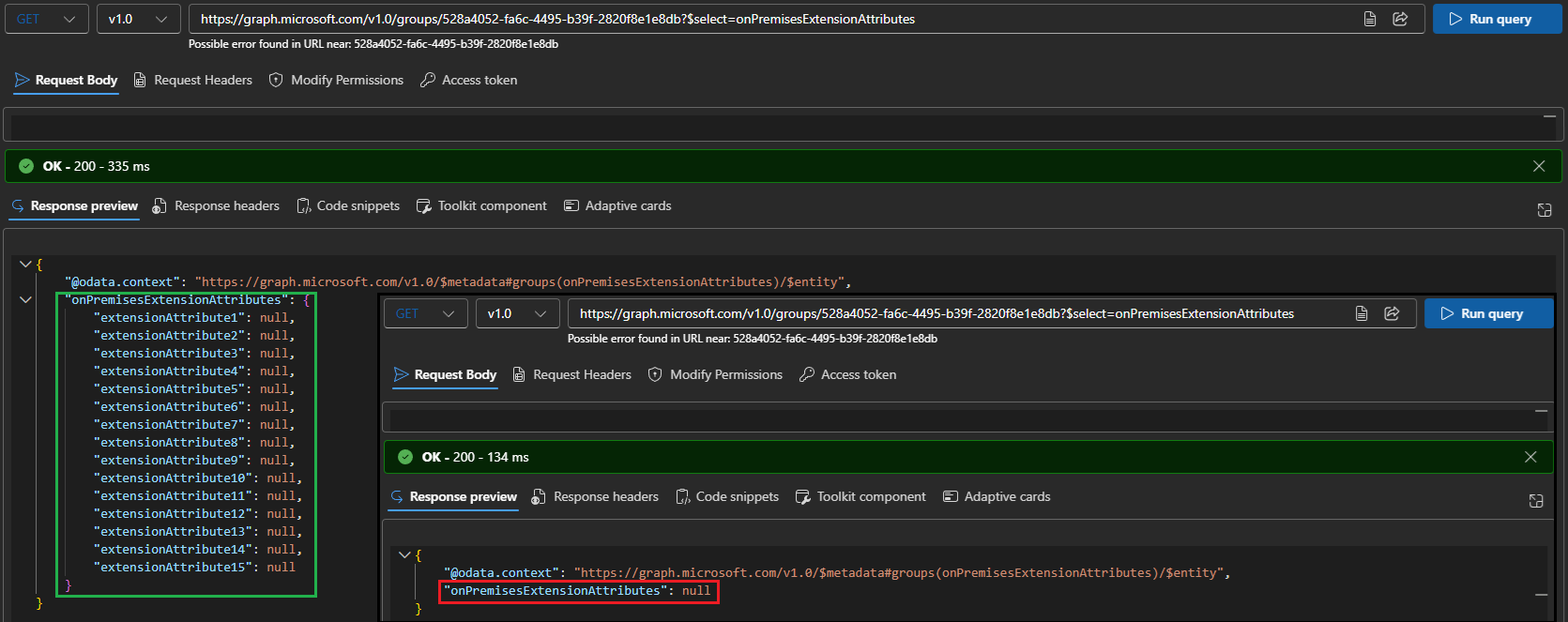 The screenshot above shows how the output looks like for a query executed with sufficient permissions (Group.Read.All), and one without (the inset). As you can see in the latter scenario, the output uses a different format, which we can use as clue to the “missing permissions” root cause. Another thing to point out is that the group referenced on it does not (seem to) have any values currently configured for the set of customAttributeXX… or does it?
In fact, it does, and this reflects one of the current limitations of how onPremisesExtensionAttributes work for group objects in the Graph. Recall the quote from the “what’s new” page above, which explicitly mentions “synchronized”. Said group does not get synced from on-premises AD, and thus fails outside of the scope of what’s currently supported. In other words, don’t blindly trust the output of the Graph query, without also checking the group status:
Get-DistributionGroup 528a4052-fa6c-4495-b39f-2820f8e1e8db | select Name,Alias,External*,CustomAttribute*,IsDirSynced
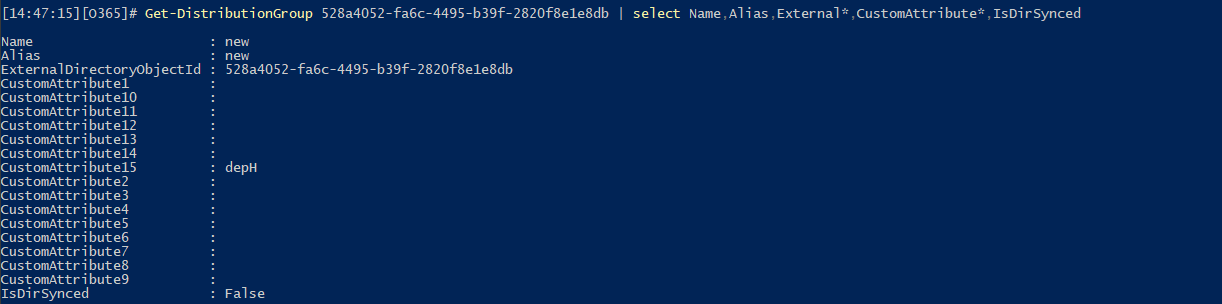
Therefore, when it comes to “bulk” queries, make sure to also include the IsDirSynced property in the output, or filter by it. Speaking of which, we can use the $filter operator against specific extensionAttributeXX values, null included. This gives us the option to list groups objects with specific (or non-null) values on one or more of the attributes, but as lambda queries are not supported, an “any” query must list all individual attributes instead. Regardless, here are some useful examples:
#Return all groups with non-null value of extensionAttribute10
GET https://graph.microsoft.com/v1.0/groups?$select=id,onPremisesExtensionAttributes&$filter=onPremisesExtensionAttributes/extensionAttribute10 ne null&$count=true

#Return all synchronized groups with non-null value of extensionAttribute10
GET https://graph.microsoft.com/v1.0/groups?$filter=onPremisesExtensionAttributes/extensionAttribute10 ne null and onPremisesSyncEnabled eq true&$count=true&$select=id,displayName,onPremisesExtensionAttributes,onPremisesSyncEnabled

#Return all synchronized Distribution groups with non-null value of extensionAttribute10
GET https://graph.microsoft.com/v1.0/groups?$filter=onPremisesExtensionAttributes/extensionAttribute10 ne null and onPremisesSyncEnabled eq true and mail ne null and NOT groupTypes/any(c:c eq 'Unified')&$count=true&$select=id,displayName,onPremisesExtensionAttributes,onPremisesSyncEnabled,groupTypes,mail,securityEnabled
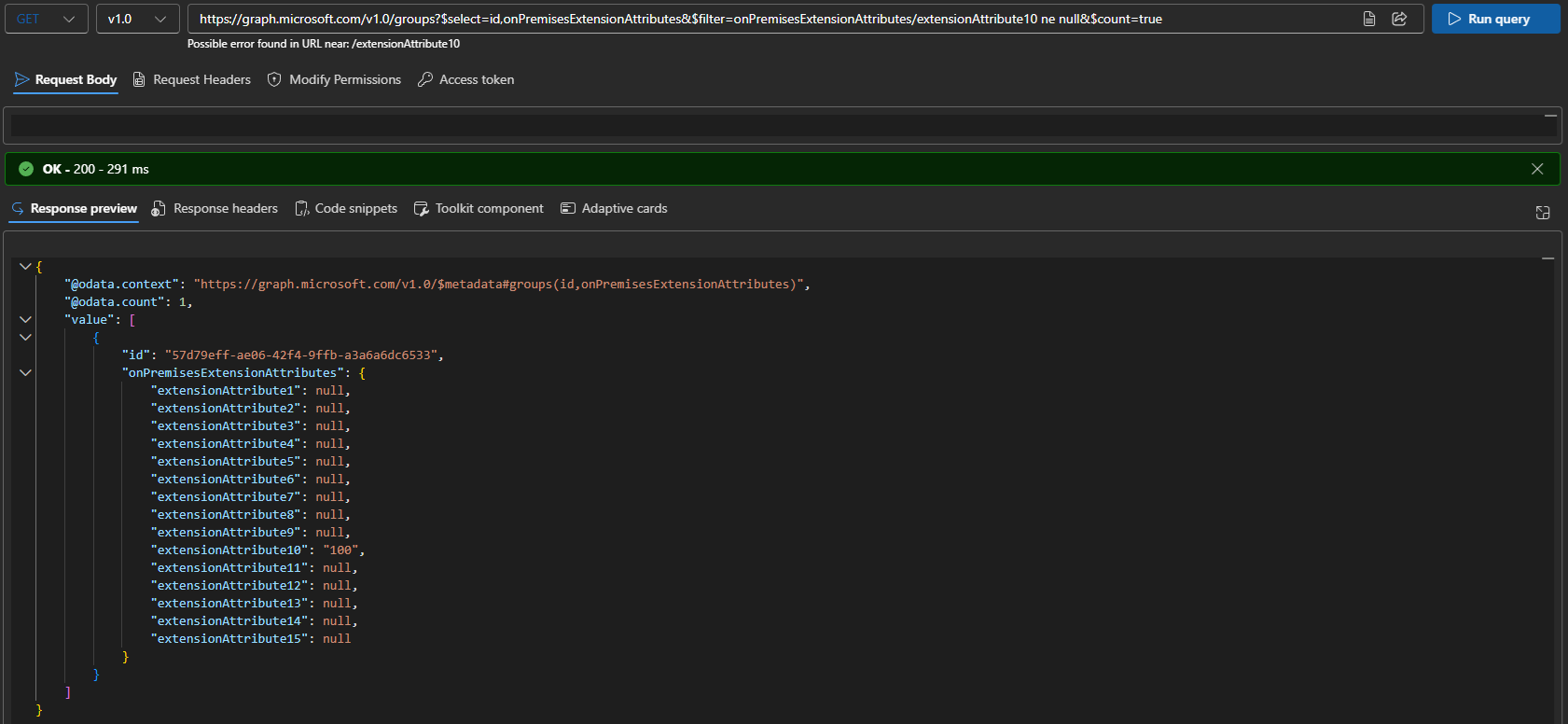
Do remember that filtering on null values is considered an advanced query, thus requires the use of the ConsistencyLevel header (with eventual as value) and the $count operator.
The filter examples above are a nice segway to the next limitation, namely no support for Microsoft 365 Groups. This is likely also a direct consequence of the “synchronized” qualifier, but at the end of the day, you’d do well to remember that Microsoft 365 Groups do indeed support the set of CustomAttributeXX (and even ExtensionCustomAttribute1-5).
No write currently supported
Let’s now go back to the first keyword, access. Whether choosing it was deliberate and serves to imply the lack of support for any edit operations is unclear. What’s clear is that the updated documentation does not list onPremisesExtensionAttributes as one of the supported operations for the PATCH method. That has never stopped us before though, so let’s do a quick test, shall we:
PATCH https://graph.microsoft.com/v1.0/groups/57d79eff-ae06-42f4-9ffb-a3a6a6dc6533
{
    "onPremisesExtensionAttributes": {
        "extensionAttribute1": "test"
    }
}
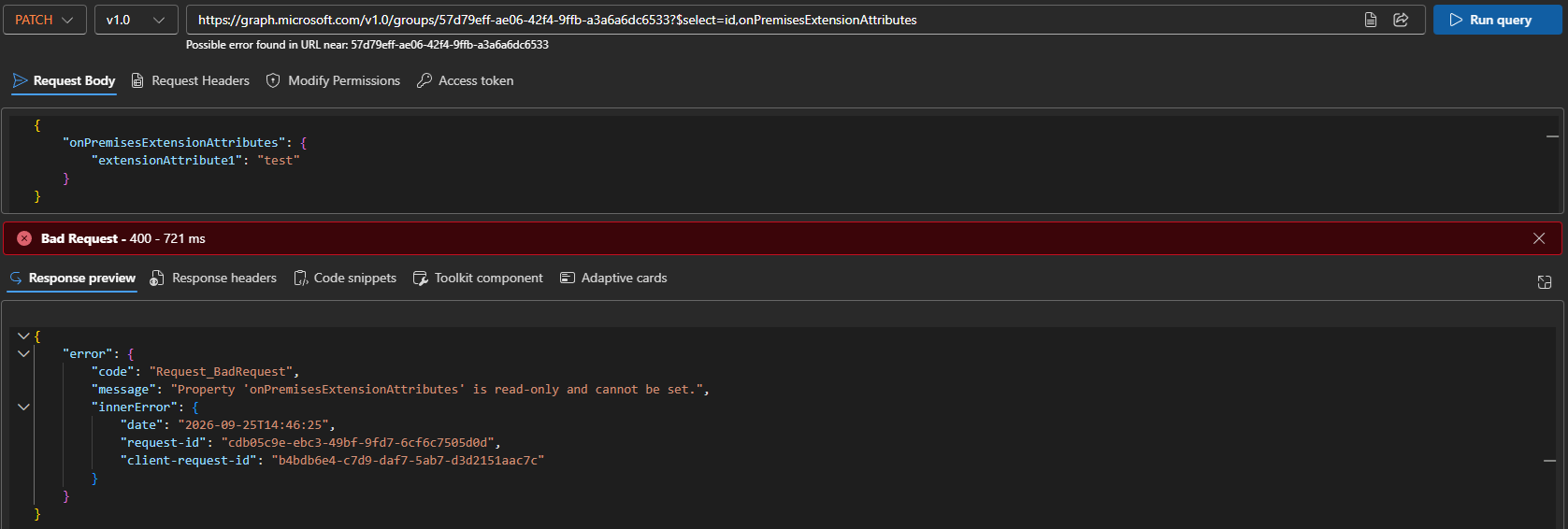 As you can see from the screenshot above, the request failed with a 400 Bad Request error, and the following error message: “Property ‘onPremisesExtensionAttributes’ is read-only and cannot be set.”. Add to this the fact that objects synchronized from on-premises AD are by design not editable via the Graph API, and we have a twofold enforcement of read-only access.
What is even more annoying is that while we can make changes to the set of CustomAttributeXX for cloud-authored groups via the Exchange Online PowerShell cmdlets, said changes will never reflect on the Graph API side. As some of you probably recall, ExO does use its own directory store (ExODS) and a dual-write model that ensures changes to relevant attributes are committed only after successful writes to both ExODS and Entra ID. This might be a potential workaround for write access, if onPremisesExtensionAttributes is ever exposed for non-synced objects via the Graph API. And of course, not even the ExO cmdlets can help us with objects where the on-premises AD is the source of authority.
PowerShell examples
The examples we used above all rely on the raw Graph API queries. You can however also use the Graph SDK for PowerShell cmdlets to the same effect. Here’s how:
#Fetch onPremisesExtensionAttributes for specific group object
Get-MgGroup -GroupId 57d79eff-ae06-42f4-9ffb-a3a6a6dc6533 -Property onPremisesExtensionAttributes | select -ExpandProperty onPremisesExtensionAttributes | fl

#Get a list of all group objects along with their onPremisesExtensionAttributes
Get-MgGroup -Property id,onPremisesExtensionAttributes | select id -ExpandProperty onPremisesExtensionAttributes

#List all group objects with non-null value for ExtensionAttribute10
Get-MgGroup -Filter "onPremisesExtensionAttributes/ExtensionAttribute10 ne null" -Property id,onPremisesExtensionAttributes -ConsistencyLevel eventual -CountVariable count | select id -ExpandProperty onPremisesExtensionAttributes

#List all supported group objects along with their onPremisesExtensionAttributes
Get-MgGroup -Filter "onPremisesSyncEnabled eq true and mail ne null and NOT groupTypes/any(c:c eq 'Unified')" -Property id,onPremisesExtensionAttributes -ConsistencyLevel eventual -CountVariable count | select id -ExpandProperty onPremisesExtensionAttributes
Do remember to add -ConsistencyLevel eventual and -CountVariable parameters when filtering against the set of custom attributes. Some oddities in how the Graph SDK for PowerShell handles output might also get in your way, but nothing we cannot work around.
We can also use the cmdlet from the Entra PowerShell module:
#Fetch onPremisesExtensionAttributes for specific group object
Get-EntraGroup -GroupId 57d79eff-ae06-42f4-9ffb-a3a6a6dc6533 -Property "id,onPremisesExtensionAttributes" | select -ExpandProperty onPremisesExtensionAttributes

#Get a list of all group objects along with their onPremisesExtensionAttributes
Get-EntraGroup -Property id,onPremisesExtensionAttributes | select id -ExpandProperty onPremisesExtensionAttributes
When it comes to filtering against onPremisesExtensionAttributes however, the module is not up to the task as it still doesn’t support advanced queries. The same applies to filtering on “supported” group objects, as we need the NOT operator therein, making it an advanced query filter.
Summary
In summary, we finally have support for onPremisesExtensionAttributes for group objects in the Graph API, albeit with some limitations. The set of CustomAttributeXX seems to currently only be supported for groups that are synchronized from on-premises AD, with data simply not returned for any “non-supported” object. As cloud-authored distribution groups, mail enabled security groups and Microsoft 365 Group all support CustomAttributeXX, the current implementation will likely be a source of confusion.
Likely due to the dependency of source of authority, the current implementation does not seem to support any edit methods either. It also does not cover the set of 5 multi-valued ExtensionCustomAttribute1-5. In other words, you are probably better off sticking to good old Exchange Online PowerShell cmdlets for the time being. Still, it is good to know that Microsoft is looking to expand support for onPremisesExtensionAttributes.