Back in 2023 Microsoft launched the app instance property lock feature. While the name likely means nothing to the average admin, the feature does address one serious gap in securing application access, as we explained in our initial article on this. An year later Microsoft toggled this feature on by default for all tenants, which is generally speaking the correct approach for the majority of scenarios. Until you start receiving requests or complaints from your dev and operations teams, which might have valid need to add password credentials, for example.
To help address such scenarios in a better way, Microsoft is now introducing a scoping mechanism for the protection offered by the app instance property lock feature. Which is what we will cover in this article. And since we’ve also received some new UI bits, not yet reflected in the official documentation, we might as well cover these, too.
Let’s start with the important part first. A new property has been added to the servicePrincipalLockConfiguration resource, a enum value that allows you to control in which tenants the configured property lock will be enforced. Well, sort of, but more on that in a second. Said property is named enforcementScope and is currently only available under the /beta branch and accepts the following values:
- notConfigured – the default value
- foreignTenantOnly – enforce the property lock restrictions only in tenants other than the “home” one
- everywhere – enforce the property lock restrictions in every tenant, including the “home” one
Despite what the current documentation says, you can indeed modify the enforcementScope property. As with any other property of the servicePrincipalLockConfiguration resource, you would need the Application.ReadWrite.All permissions in order to make changes. Use the PATCH method and provide a JSON payload containing the desired values. You can find a example using the Graph explorer tool below:
PATCH https://graph.microsoft.com/beta/applications/xxxxxxxx-xxxx-xxxx-xxxx-xxxxxxxxxxxx

{
    "servicePrincipalLockConfiguration": {
        "isEnabled": true,
        "allProperties": true,
        "enforcementScope": "foreignTenantOnly"
    }
}
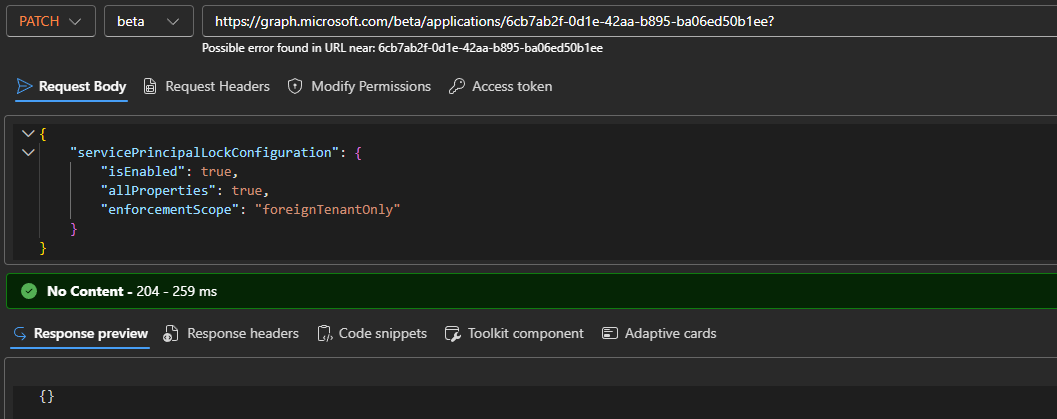 You don’t need to provide values to properties you are not planning to modify. As shown on the screenshot above, successful execution is indicated by an 204 No Content response. To confirm the changes run a GET query:
GET https://graph.microsoft.com/beta/applications/xxxxxxxx-xxxx-xxxx-xxxx-xxxxxxxxxxxx?$select=servicePrincipalLockConfiguration
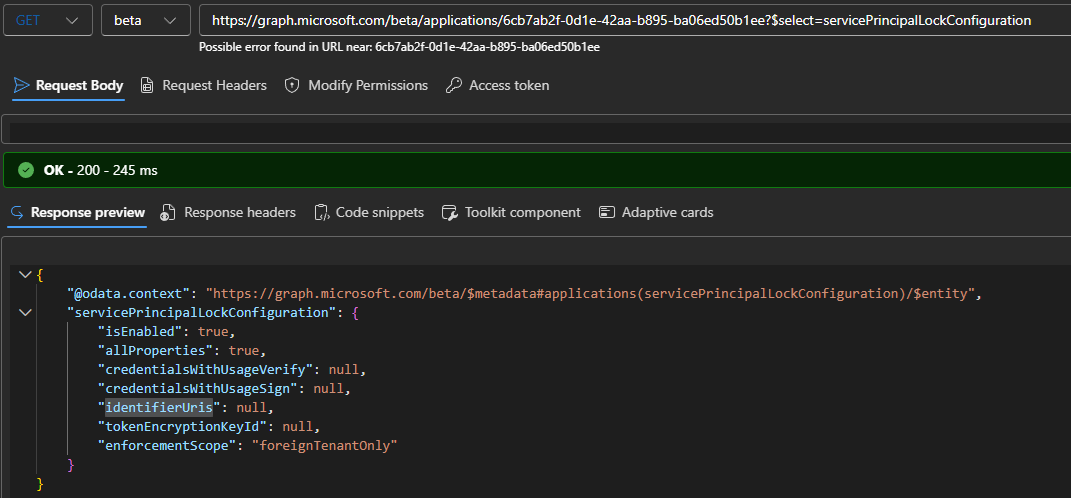 At this point, the configured lock settings should block modification of the specified properties (all) on the service principal object across any “foreign” tenants it has been added to. In contrast, users with sufficient permissions within the app’s home tenant can still add or remove credentials or modify any of the “locked” properties.
Speaking of properties, you might have noticed that the output on the screenshots above does contain another entry, and it is not listed as currently supported under the servicePrincipalLockConfiguration resource documentation. We’re talking about the identifierUris property, which is used in scenarios where the app acts as the resource and thus can be seen as the value of the aud claim within access tokens. On the service principal object, this is represented via the servicePrincipalNames property, and should not be confused with the Reply/Redirect URIs.
Like most other properties, the value of servicePrincipalNames is inherited from the associated application object, but in some scenarios, more values can be appended. Which is what the presence of identifierUris property under the output of service principal lock configuration resource in the screenshots above alludes to, I assume. We will have to wait for Microsoft to update the official documentation on this. And since the default is to have the lock enabled on all applications and all their supported properties, going forward servicePrincipalNames changes will be blocked.
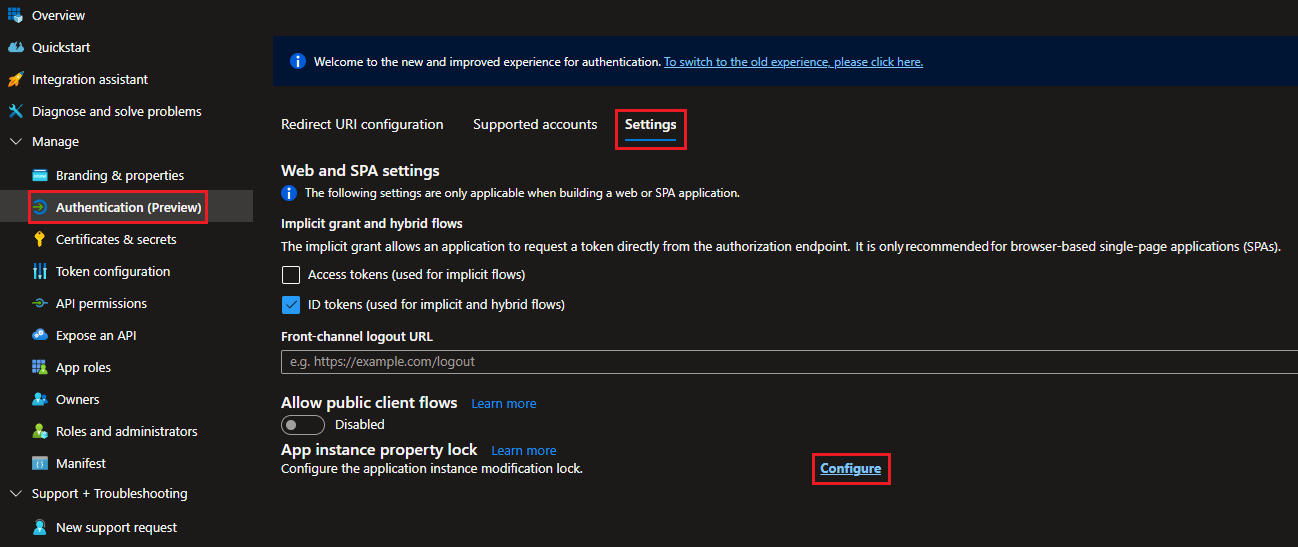
Lastly, some UI changes related to the new/preview Authentication experience need to be mentioned. Nothing major, simply splitting the configuration on multiple tabs/pages, but as the current documentation does not reflect said changes, I though it might be useful to mention them. Thus, to configure service principal lock restrictions, head over to the Entra portal, select the application object in question and then Authentication (preview). Next, click on Settings, then click the Configure button next to App instance property lock.
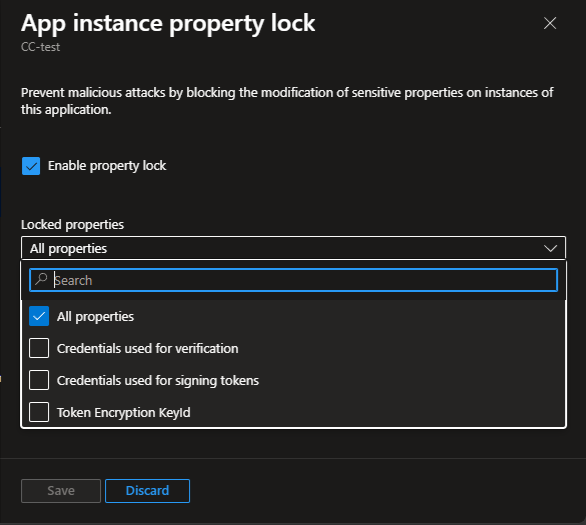
Once the App instance property lock pane pops up on the right, use the Enable property lock checkbox to toggle the protection On or Off. Under the Locked properties dropdown, make sure the default All properties entry is selected, or select individual properties as required. As the enforcementScope property we discussed above is still only available under the /beta branch, you will not find an entry for it here. Press the Save button to confirm any changes made.
 And with that, we can close the current article. A small, but useful update that allows organizations to scope the effect of the service principal property lock feature to only foreign-tenants, a hint that the feature will soon expand to cover identifierUris values too, and some UI reorganization – nothing earth shattering. Nevertheless, it is always nice to see Microsoft updating a feature, and not putting it into oblivion after the initial release (cough *PAM* cough).
Oh, maybe one last thing. The scoping mechanism described above does not change the behavior of the service principal lock feature when it comes to existing property values, as in toggling it will not affect any password credentials that have already been added, for example. For a proper cleanup, consider using the script we outlined in this article.