Microsoft’s marketing machine continues to bombard customers with puff pieces about the greatness of AI and the futility of resisting the switch to E7. Yet when it comes to actually delivering the promised reality-breaking features and products, it is a different story. And on the governance side of things, coverage is still… opportunistic at best, but even that can be seen as a success story, compared to the glacial pace we’re witnessing on the API front.
Agent 365 APIs are GA
A quarter has passed since our initial look at the Agent 365 APIs, and in the meantime, Microsoft declared the Agent 365 API as generally available. If all you care about are read-only methods, that is. Only the GET and LIST methods are /v1.0 worthy at present, with the availability and assignment methods still only available under /beta.
Not much has changed for the methods that moved to /v1.0 either. There is still no support for the $select operator, so you are forced to get the full response, always. But there are some positives to talk about. First, “regular” packages are no longer returned in the output, so in effect, you don’t have to add the $filter=supportedHosts/any(x:x eq ‘Copilot’) query parameter in order to get only the agent objects.
In addition, application permissions are now supported, which finally makes it possible to obtain an inventory of your agents in a non-interactive manner. The corresponding permission needed is CopilotPackages.Read.All. The “write” flavor has also been introduced, CopilotPackages.ReadWrite.All, albeit there’s no point in using it currently, as none of the “write” methods support application permissions currently.
With the above in mind, here’s a quick example on how to leverage application permissions to fetch the set of agents within your tenant:
#Fetch an access token via client credentials
Add-Type -Path "C:\Program Files\WindowsPowerShell\Modules\MSAL\Microsoft.Identity.Client.dll"
$app = [Microsoft.Identity.Client.ConfidentialClientApplicationBuilder]::Create("xxxxxxxx-xxxx-xxxx-xxxx-xxxxxxxxxxxx").WithClientSecret("blablabla").WithTenantId("tenant.onmicrosoft.com").Build()

$Scopes = New-Object System.Collections.Generic.List[string]
$Scope = "https://graph.microsoft.com/.default"
$Scopes.Add($Scope)

$token = $app.AcquireTokenForClient($Scopes).ExecuteAsync().Result
$authHeader1 = @{
   'Content-Type'='application/json'
   'Authorization'="Bearer $($token.AccessToken)"
}

#Fetch all agents
$uri = "https://graph.microsoft.com/v1.0/copilot/admin/catalog/packages"
$response = Invoke-RestMethod -Method GET -Uri $uri -Headers $AuthHeader1

$response.'@odata.count'
251
$response.value
As far as I can tell, nothing else has changed with the move to /v1.0, and actual management of agents is still only possible by using the /beta methods. So, if you do need to manage agents at scale, you either have to use an unsupported API or perhaps create a computer-using agent that can perform the corresponding actions within the portal. Fun.
One last rant here – the Agent (package management) API continues to enforce an Agent 365 licensing requirement post-GA. No surprise here, as Microsoft has made their intentions very clear on that point. So, while every customer gets access to the “basic” Agent 365 functionality within the M365 Admin center, customers that are looking for automated solutions will have the privilege of spending additional $$$ on an API that doesn’t even match what’s possible (for free) in the UI. Make it make sense.
Copilot policy settings
Which brings us to the next scenario: configuring any of the few dozen settings exposed within the Copilot and/or Agent 365 pages within the Microsoft 365 portal. Those range from “pinning” Copilot chat for your users to enabling Frontier access to allowed agent types and who can share an agent. Can you guess how many of those controls can currently be configured via an API, or in general, outside of the portal?
The answer is 5 (five). This is the extend to the copilotPolicySetting API has been developed. Here’s the list of setting IDs:
| Setting ID | Setting name |
|---|---|
| microsoft.copilot.copilotchatpinning | Pin Microsoft 365 Copilot Chat |
| microsoft.copilot.blockaccesstoopenfiles | Block Copilot Access to Open Content |
| microsoft.copilot.imagegeneration | Control access to Designer Image Generation |
| microsoft.copilot.allowwebsearch | Allow web search in Copilot |
| microsoft.copilot.allowinadmincenters | Control Admin Copilot availability in Microsoft 365 Admin Center |
The copilotPolicySetting API has been in preview since April, and is another example of the sad state of the governance APIs for Copilot and Agent 365. Not even a LIST method is currently available, so you must know the setting ID value, before you can even query it (individually). And you’ve guessed it, the API is only available under the /beta endpoint and currently only supports delegate permissions. Specifically, you’d need the CopilotPolicySettings.Read permission to fetch the currently configured values for the corresponding policy and CopilotPolicySettings.ReadWrite in order to modify it. There is no mention as to what admin role is required, so the examples below are performed with the Global administrator.
As a side note here, application permissions variants of the two scopes above are actually available and can be assigned to an application. However, the API methods currently do not recognize such scopes and any query made in an application context will result in a 403 Forbidden error.
With the permissions granted, we can use a tool such as the Graph explorer to work with the handful of supported settings. A simple GET request against the /beta/copilot/admin/policySettings/{id} endpoint will fetch the policy object, as well as its associated setting value, where configured. For example, the below request gets the value for the Pin Microsoft 365 Copilot Chat policy/setting:
GET https://graph.microsoft.com/beta/copilot/admin/policySettings/microsoft.copilot.copilotchatpinning
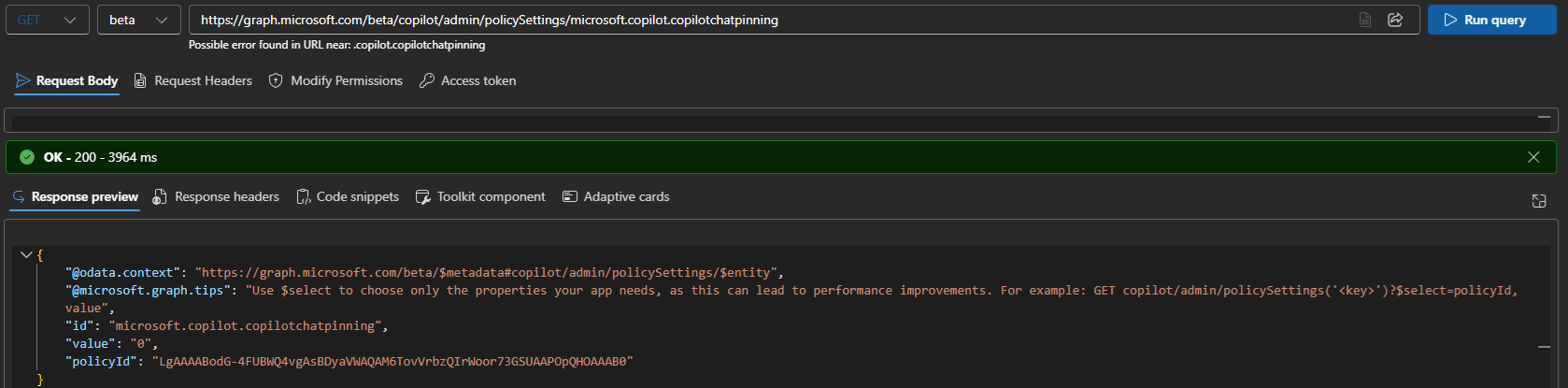
The value property from the output tells us the state of the corresponding setting, with the value of 0 signaling that in this tenant, the setting is in its disabled state (“Do not pin Copilot Chat and do not prompt users to pin it”). A value of null tells us that the corresponding setting is not configured (“value”: null). If the policy itself is not configured for the tenant, you’ll see a “policyId”: null value instead, which is the default for new tenants. Refer to the official documentation for additional details and examples.
To update any of the supported settings, you can use a PATCH request against the /beta/copilot/admin/policySettings/{id} endpoint. In the example below, we toggle the value to “0”. Funny enough, for the microsoft.copilot.imagegeneration setting, a value of 1 translates to it being disabled, and 0 is enabled.
PATCH https://graph.microsoft.com/beta/copilot/admin/policySettings/microsoft.copilot.imagegeneration

{
  "value": "0"
}
 Of course, not every setting can be represented via binary (or integer) values, and as support for the various Copilot policies expands, more types will need to be supported. In fact, the documentation refers to this fact, but does not currently give any specific examples of such setting values. In addition, there is currently no support for scoping Copilot policies to a subset of your users via groups or any other mechanism, but the documentation does acknowledge such scenarios.
Before closing this section, one interesting bit deserves a mention. Namely, the policyId value has the format of an Exchange storeId, indicating that the corresponding policy object likely resides within a system/arbitration mailbox. More specifically, the Organization Partition_PolicyService_c2ada927-a9e2-4564-aae2-70775a2fa0af arbitration mailbox, or referenced via its PolicyService_c2ada927-a9e2-4564-aae2-70775a2fa0af name/alias.
Using a tool such as MFCMAPI, you can then get the corresponding items under the ApplicationDataRoot subtree and its c2ada927-a9e2-4564-aae2-70775a2fa0af subfolder. Any (configured) Copilot policy seems to have its own item under the a4900027-b443-4789-aade-1180a176b8d0 subfolder with a class of SDS.c2ada927-a9e2-4564-aae2-70775a2fa0af.Setting. For example, this is how the microsoft.copilot.imagegeneration setting is represented:
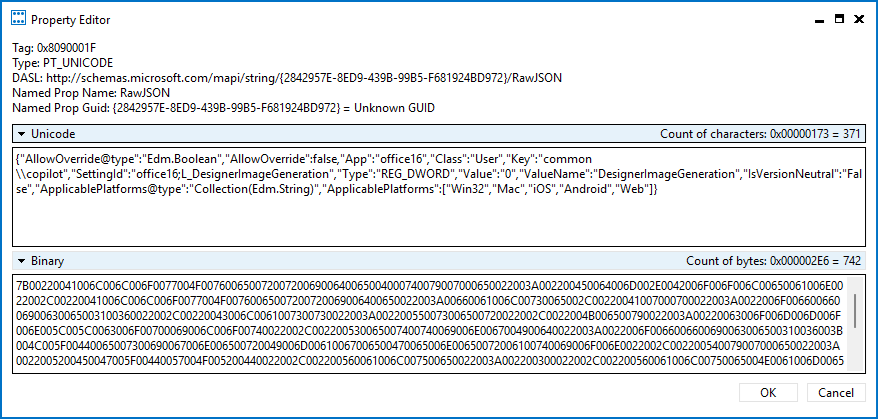 Incidentally, this also explains the fact why the same policyId value is returned for all supported settings.
Closing remarks
So, in the end of July 2026, a month after the GA of Agent 365 and several years into Microsoft’s AI journey, the state of the APIs used for reporting or managing agents, copilot settings and related configurations remains outright disappointing. We keep hearing how AI will drive 5x, 10x, whateverx increase in productivity, yet when it comes to delivering on the first-party examples of this revolution, reality seems to reveal a different story. Another way of viewing this is that Microsoft doesn’t see APIs as any sort of priority and is happy to confine their customers to using the UI tools, where available.
The few methods that are currently available are mostly limited to interactive scenarios or do not cover any write operations, rendering them only useful for reporting scenarios. In effect, any organization that is looking to manage things at scale or to align their implementation with industry standards or best practices can only do so via the good old “manual” method, one painful click at a time. Then again, maybe computer-using agents are the solution we were supposed to get all along? 🙂
To end things on a slightly positive note, there is some light in the tunnel coming in the form of a new private preview that is going to focus on multi-tenant management for Copilot and agents. Once it reaches the public preview stage, I will follow up with another “state of the union” post, hopefully one less rant-y than the present one.