The Office 365 Reporting Web Service is one of those rare fossils that have been around since the launch of the service, with hardly any updates since its release. We last covered it back in 2022, when Microsoft added support for OAuth for it. In time, most of the “reporting” endpoints it exposed have been replaced, and now it is time to do the same with the MessageTrace one. Meet the Graph messageTraces endpoint!
Prerequisites
First things first, in order to try the newly released endpoint you will need to manually provision its service principal. This is likely something Microsoft will address, but for the time being, you need to run the following cmdlet to instantiate a copy of the Transport Data Platform service principal (with AppId of 8bd644d1-64a1-4d4b-ae52-2e0cbf64e373) in your tenant:
#Connect to the Graph with required permissions
Connect-MgGraph -Scopes Application.ReadWrite.All

#Provision the service principal
New-MgServicePrincipal -AppId 8bd644d1-64a1-4d4b-ae52-2e0cbf64e373

DisplayName             Id                                   AppId                                SignInAudience      ServicePrincipalType
-----------             --                                   -----                                --------------      --------------------
Transport Data Platform 170ba822-7b9d-4998-8acc-31e08b1414ec 8bd644d1-64a1-4d4b-ae52-2e0cbf64e373 AzureADMultipleOrgs Application
It can take a while for the process to complete, as noted in the official announcement for the feature, so give it few hours.
Next, it’s important to understand what this new endpoint is and what it is not. It’s NOT a replacement for the message trace functionality exposed via the Exchange Admin Center or PowerShell (Get-MessageTraceV2, Get-MessageTraceDetailV2 and *-HistoricalSearch). In other words, it will be of no use to most administrators. Instead, it is a replacement of the REST-ful MessageTrace report, which was previously exposed under:
https://reports.office365.com/ecp/reportingwebservice/reporting.svc/MessageTrace
If you haven’t heard about the above, you can safely ignore this release and keep using the EAC/PowerShell methods.
Moving on, as with all things Graph, you will need permissions. The newly introduced ExchangeMessageTrace.Read.All scope will suffice. It comes in both delegate and application permission flavors, so automated scenarios are accounted for. As this endpoint exposes an admin level functionality, the calling will need to have sufficient permissions to run message traces, the least privileged role for which is ExO’s View-Only Recipients one.
Running a sample request
Using the endpoint itself is quite simple, all you need to do is issue a GET request against it:
GET https://graph.microsoft.com/beta/admin/exchange/tracing/messageTraces
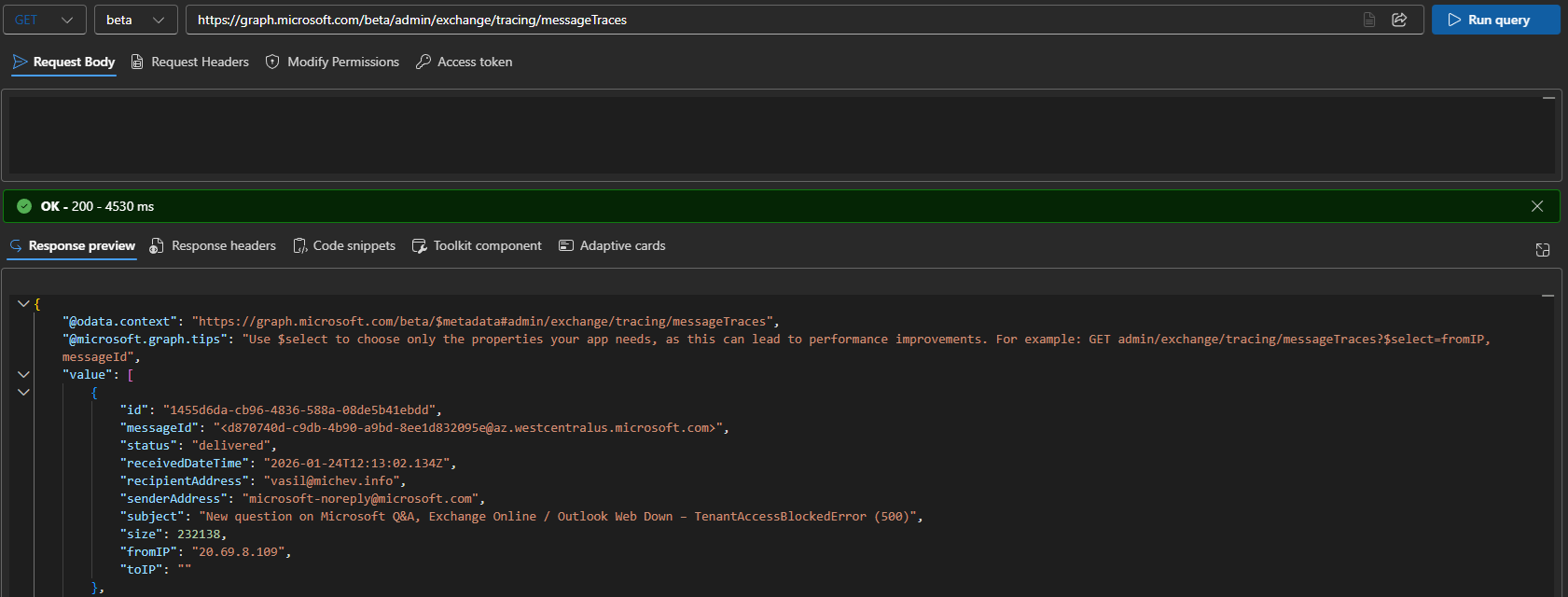
By default, data from the past two days is retrieved, matching the behavior of the Get-MessageTraceV2 cmdlet. The level of detail exposed is also the same:

If you want to expand the results beyond the default 2 days period, you can leverage the $filter parameter.
#Filter based on receivedDateTime
GET https://graph.microsoft.com/beta/admin/exchange/tracing/messageTraces?$filter=receivedDateTime ge 2026-01-01T12:41:40.711Z and receivedDateTime le 2026-01-02T12:41:40.711Z
The exact same restrictions as that of the Get-MessageTraceV2 cmdlet apply here: you can only cover messages from the last 90 days, and a single query cannot span more than 10 days.
By default, the endpoint will return up to 5000 results, in pages of 1000 each. Use the $top operator to adjust the maximum page size, with 5000 being the limit. If more than a single page of results is returned, you can leverage the @odata.nextLink facet to fetch the next page.
The $select operator is not supported and you cannot leverage it to minimize the level of detail returned.
More filter examples
Apart from filter against the receivedDateTime property, you can also filter by sender or recipient address, status, subject and so on. Any of the filter parameters supported by Get-MessageTraceV2 can be used:
#Filter by specific sender
GET https://graph.microsoft.com/beta/admin/exchange/tracing/messageTraces?$filter=senderAddress eq 'dmarcreport@microsoft.com'

#Filter by subject (default behavior is "contains")
GET https://graph.microsoft.com/beta/admin/exchange/tracing/messageTraces?$filter=subject eq 'Report'

#Filter by subject and startsWith
GET https://graph.microsoft.com/beta/admin/exchange/tracing/messageTraces?$filter=startsWith(subject,'Report')

#Filter by sender domain
GET https://graph.microsoft.com/beta/admin/exchange/tracing/messageTraces?$filter=senderAddress eq '*@microsoft.com'
Here’s the fun thing – if you try filter on a non-supported property, say size, you get an intimate look into the implementation of the new endpoint, which turns out to be just a wrapper for Get-MessageTraceV2… surprise surprise!
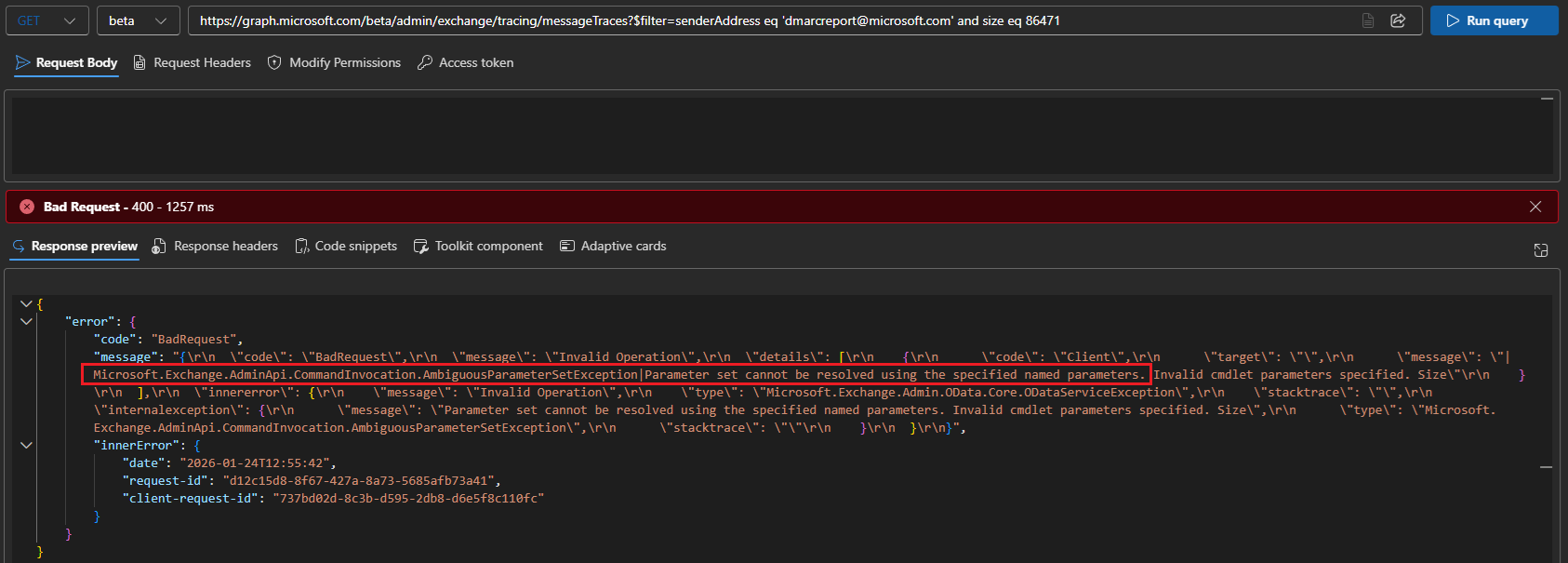
Given the above, it’s no wonder that we get no support for the other standard Graph query operators.
Getting message trace details
Thus far, we have only covered the messageTraces endpoint, aka the analogue of the Get-MessageTraceV2 cmdlet. There is one more endpoint included in this release, namely the getDetailsByRecipient one. Or in other words, the analogue of the Get-MessageTraceDetailV2 cmdlet. To use it, we need the id of an existing messageTrace result, which we can get from the above, as well as the recipient’s address. Here’s how to use the endpoint:
GET https://graph.microsoft.com/beta/admin/exchange/tracing/messageTraces/42578eec-57ad-48c4-5db4-08de5b45ec37/getDetailsByRecipient(recipientAddress='dmarc-reports@michev.info')
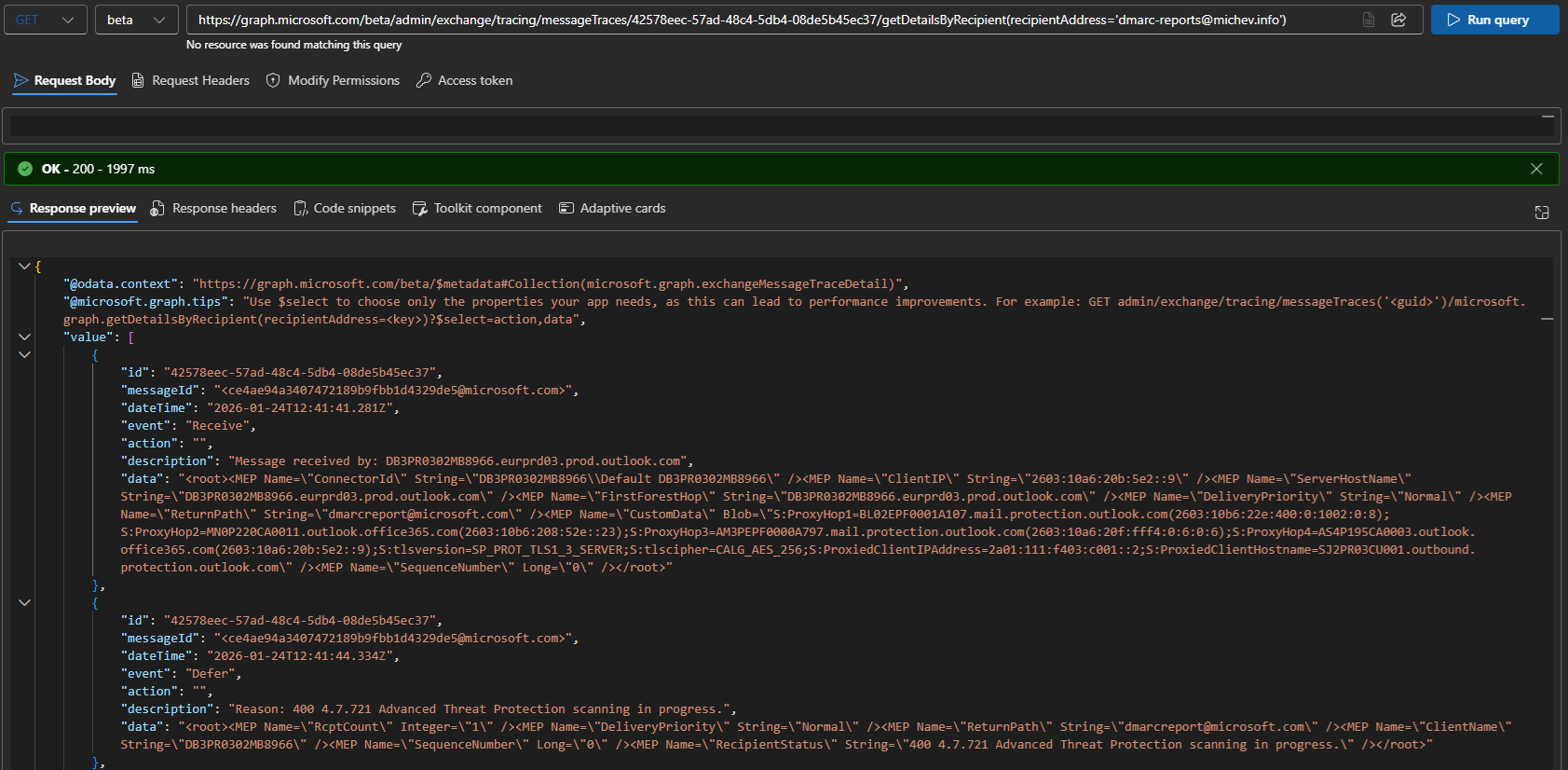
with the output cut off for brevity. As expected, it is the exact same data as that returned by Get-MessageTraceDetailV2. The exact same permission requirements apply to this endpoint. There is no support for $select or $top, but you can still leverage the $filter operator:
#Filter message trace details on specific Event value
GET https://graph.microsoft.com/beta/admin/exchange/tracing/messageTraces/42578eec-57ad-48c4-5db4-08de5b45ec37/getDetailsByRecipient(recipientAddress='dmarc-reports@michev.info')?$filter=event eq 'Defer'
Closing remarks and summary
Before closing the article, one more interesting observation can be mentioned: the new endpoints use a publicly exposed app service, as in https://tdp-webapp-nam00.azurewebsites.net/admin/messageTraces. In other words, you don’t even need to use the standard https://graph.microsoft.com URI… fun, right? Not really, but hopefully the good folks at Microsoft will get their house in order, one day.

In summary, we now have a way to obtain Exchange Online message trace results via the Graph API. Our examination shows this to be a wrapper (over a wrapper) for the the Get-MessageTraceV2 and Get-MessageTraceDetailV2 cmdlets, with all the pros and cons. On one hand, you can use the exact same syntax and work with familiar output. Plus, application permissions are supported out of the box. But many of the benefits one can expect from a “modern” Graph-based endpoint aren’t present. Limited filtering capabilities, no support for the $select operator, no way to create a subscription to fetch the results, and so on. And probably more importantly, the same throttling limit as the existing cmdlets, as noted in the official announcement.
1 thought on “Fetch message trace data via the Graph API”