As I’m still affected by my sudden urge to generate some Windows Forms based tools, I’ve been working on a script to mimic Outlook’s Delegate management functionality. The dialog and logic behind the tool are all done but as I was running tests on some of the more convoluted scenarios, I run into an issue with using the Set-MailboxFolderPermission cmdlet for removing the “delegate” flag. TL;DR – it just doesn’t work as expected. Here are the details.
Let’s start by reminding the reader that few years ago the set of *-MailboxFolderPermission cmdlets was improved to handle “delegate” scenarios. You can find detailed information about this in our original article on the topic. These updated cmdlets only cater to some of the possible configurations supported by Outlook or EWS, but were still nice to have, at that time. With the upcoming deprecation of EWS and the move to the New Outlook client however, things are getting more dire. In fact, the recently released “parity” methods, as part of the “admin” API rely on the *-MailboxFolderPermission cmdlets to implement support for delegate scenarios, and thus are by design limited in functionality, compared to EWS.
With the above in mind, I chose to implement the “business logic” of the tool based on the set of *-MailboxFolderPermission cmdlets and even addressed some of their shortcomings in the tool. But more on that in our next article. For the current one, the stage is set, and it’s time for the big reveal – the Set-MailboxFolderPermission has issues with handling the Delegate flag as part of the SharingPermissionFlags property.
The issue affects specific “delegate” configurations only, but given the defaults used by Outlook, it should be relatively wide spread (should you decide to manage delegates via PowerShell, that is). We can use the below example to illustrate it:
#Initial state
Get-MailboxFolderPermission gosho:\Calendar

FolderName           User                 AccessRights                                                                   SharingPermissionFlags
----------           ----                 ------------                                                                   ----------------------
Calendar             Vasil US             {Editor}                                                                       Delegate

#Try to toggle SharingPermissionFlags
Set-MailboxFolderPermission gosho:\Calendar -User vasilus -AccessRights Editor -SharingPermissionFlags None

#Change is not reflected
Get-MailboxFolderPermission gosho:\Calendar

FolderName           User                 AccessRights                                                                   SharingPermissionFlags
----------           ----                 ------------                                                                   ----------------------
Calendar             Vasil US             {Editor}                                                                       Delegate

As you can see from the above screenshot, we have a user for which at least one delegate is added (i.e. another user has been granted Editor permissions on the Calendar folder and receives copies of the meeting invites and responses addresses to the mailbox owner). If we want to remove said “delegate” access, we can either use Remove-MailboxFolderPermission to delete the whole entry, or leverage the Set-MailboxFolderPermission cmdlet to toggle the “delegate” state, ensuring the other user continues to enjoy access to the Calendar folder. But as you can see from the output of the last cmdlet, the permission entry remained in its original state.
My initial troubleshooting efforts were thrown in the wrong direction due to some questionable entries in the documentation for the cmdlets. After a while, it become clear that no matter the combination of parameters I tried, the Delegate entry didn’t go away. The only thing that worked was to reset the delegate collection itself, but that has some undesired side effects. Well, one can also remove the permission entry as a whole, as mentioned above, then re-add it. As far as workarounds go, certainly not the worst one we’ve had to use with Microsoft 365, but still, not exactly desired.
The interesting thing was that even resetting the delegate collection was only a temporary solution. Re-assigning a delegate at a later point resulted in the same behavior, so the issue was reproducible, sort of. Trying it against a number of different mailboxes and delegates across the various tenants I use resulted in a hit and miss behavior, far from any reliable method to reproduce the issue. In my desperation, I turned to the good old EWS and the delegate management methods it supports.
With the help of EWS’s GetDelegates method, the mystery quickly dissolved. Checking any of the affected mailboxes showed a matching set of entries within the delegate collection, so we had parity on that front. However, it also showed a discrepancy between how the Get-MailboxFolderPermission cmdlet reported the Delegate flag, compared to the “raw” data. As shown on the screenshot below, all the problematic entries have a False value for the ReceiveCopiesOfMeetingMessages flag:

This flag is what constitutes a delegate, if we are to rely on the documentation: The user is made a calendar delegate, which includes receiving meeting invites and responses. The reality is a bit more complex however and as already hinted, the set of PowerShell cmdlets we have do not reflect the full picture. It looks like the Get-MailboxFolderPermission cmdlet checks for the presence of a delegate entry stored within the mailbox, as shown on the screenshot above. It does NOT check the value of the ReceiveCopiesOfMeetingMessages flag.
Now that we have that part figured out, how do we go about addressing the core issue? The question to ask here is why do we get a delegate entry in the EWS response to begin with. Looking at the Permissions object for each of the returned delegate entries reveals the answer – all of the “incorrect” ones have at least one additional permission entry granted (from the set of supported “default” folders: Inbox, Tasks, Contacts, Notes and Journal, in addition to Calendar):

Removing the additional permission entry is the key to solving the issue. Once we take care of that, resetting the value of the ReceiveCopiesOfMeetingMessages flag will correctly remove the delegate info, from both the EWS delegate collection as well as the SharingPermissionFlags property. Do note however that you need to “tickle” the value of the flag for this to happen, even though a configuration with only Calendar permissions and ReceiveCopiesOfMeetingMessages value set to False should not result in a delegate entry. So I suppose we can also argue that EWS doesn’t handle things that well, too.
Once you remove any permission entry for the affected user from the Inbox, Tasks, Contacts, Notes or Journal folders, you’re able to use the Set-MailboxFolderPermission cmdlet as intended:

It is also interesting to note that OWA too has problems “interpreting” such configuration. Whenever it encounters entries in the delegate collection where ReceiveCopiesOfMeetingMessages is set to False, it will show Custom for the permissions level, even though it is technically Editor. Goes to show you how different teams within Microsoft fail to follow the same set of standards and definitions.
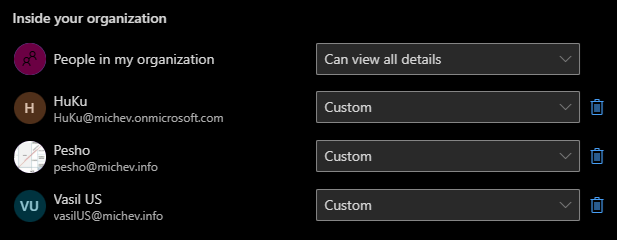
In summary, if you run into scenarios where the Set-MailboxFolderPermission cmdlet seemingly fails to commit changes to the SharingPermissionFlags property, consider checking whether the same user has been granted permissions to one of the other “default” folders. If that’s indeed the case, the value of the SharingPermissionFlags flag might incorrectly be shown as Delegate even in scenarios where it was already cleared.
While it should not affect the users in question, if it bothers you that much, you can address the issue by first removing all of the folder-level permissions granted to Inbox, Tasks, Contacts, Notes or Journal folders for the same user. At that point you can rerun the Set-MailboxFolderPermission cmdlet to clear the delegate flag. Don’t forget to re-add the folder permissions where needed. Another alternative is to use the -ResetDelegateUserCollection switch, but that also requires you to manually re-add permissions in most cases. Pick your poison.