Going over the Graph API changelog for the month, I noticed an interesting addition to the authenticationMethod resource. Namely, the lastUsedDateTime property is now available for the “parent” /authentication/methods endpoint and any of its children, giving us data on when a given method was last used. It might be a small addition, but certainly a useful one, as it gives tenants visibility into data otherwise only available via the sign-in logs.
First things first, the lastUsedDateTime property is currently only exposed under /beta, so you might not want to add it to your solutions and scripts just yet. Then again, Microsoft is known to linger for months, or even years, before graduating any given new functionality to the officially supported /v1.0 endpoint. As an example, the createdDateTime property for the same resource has been around for almost an year now. So if you believe knowing when a given authentication method was last used is important, take the risk and switch to using the /beta endpoint 🙂
In terms of permission, nothing has changed. As before you will need the UserAuthenticationMethod.Read.All scope in order to query the /authentication/methods endpoint, in either a delegate or application permissions flavor. For the former, you will also require an appropriate Entra administrative role, with the Global Reader being the least privileged one.
Here is an example on how the lastUsedDateTime property looks like for one of the users in my tenant:
GET https://graph.microsoft.com/beta/users/user@domain.com/authentication/methods

As the official documentation warns us, not every authentication method populates the last usage timestamp. Interestingly, password is one of the methods affected, as none of the users within my tenant report any usage data for it. For the methods that do report the last usage timestamp, data seems to be retroactively populated for at least the last 12 months, your mileage might vary.
Above, we are querying the “parent” /authentication/methods endpoint, but the lastUsedDateTime property is populated on the individual method-specific endpoints as well. For example, on the screenshot below we specifically query data from the /authentication/microsoftAuthenticatorMethods endpoint:
GET https://graph.microsoft.com/beta/users/user@domain.com/authentication/microsoftAuthenticatorMethods?$select=id,lastUsedDateTime
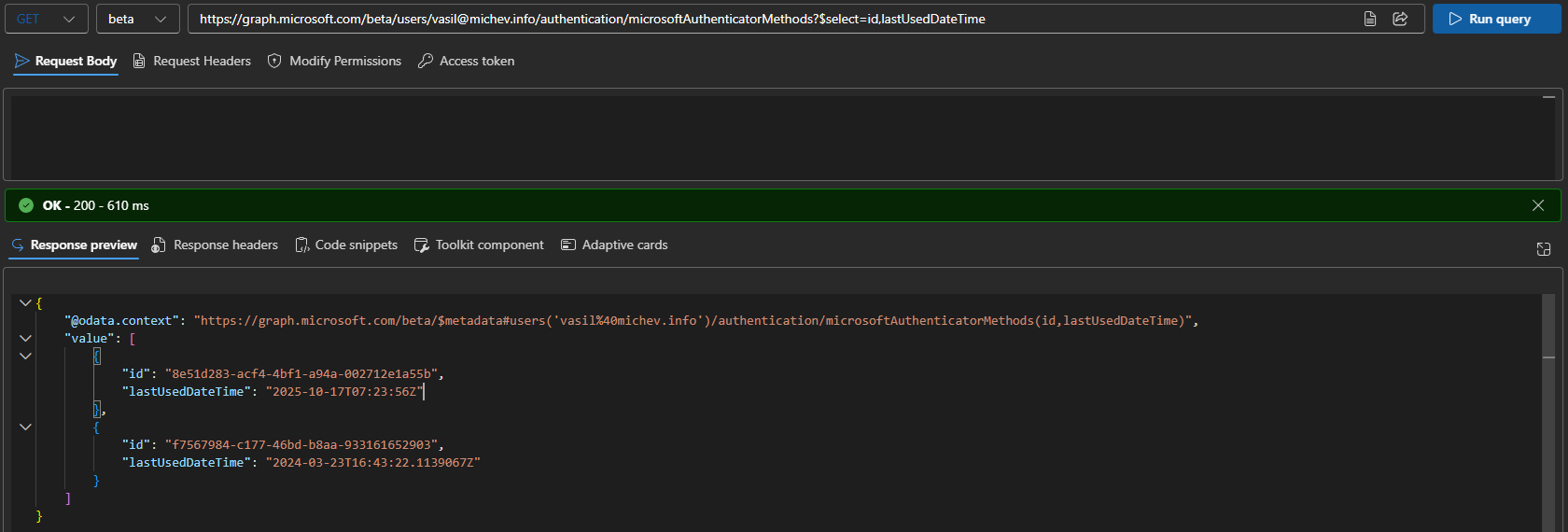
Interestingly, while the $select operator works just fine with the above query, it does not seem to work with most of its other siblings, such as the FIDO one (/fido2Methods). You can also use the $filter operator to get the set of methods used after (or before) a specific date. Sadly, only some methods seem to work for that scenario as well. Oh well, the wonders of the Graph… Here’s an example just in case:
GET https://graph.microsoft.com/beta/users/user@domain.com/authentication/methods?$filter=lastUsedDateTime ge 2019-12-08T12:24:20Z
Another interesting observation from the data within my tenant is that Microsoft seems to have changed the format used for the lastUsedDateTime property at some point, as examples from 2024 seem to include a 7-digit decimal fraction, whereas newer ones omit it. Hardly a significant change, but it does skew the output a bit 🙂
Speaking of output, if you decide to query the lastUsedDateTime property via the Graph SDK for PowerShell, you have to deal with the beloved AdditionalProperties blob. Here’s an example:
Get-MgBetaUserAuthenticationMicrosoftAuthenticatorMethod -UserId user@domain.com -Property id,lastUsedDateTime | select id,@{n="lastUsedDateTime";e={$_.AdditionalProperties.lastUsedDateTime}}

Id                                   lastUsedDateTime
--                                   ----------------
8e51d283-acf4-4bf1-a94a-002712e1a55b 2025-10-17T07:23:56Z
f7567984-c177-46bd-b8aa-933161652903 2024-03-23T16:43:22.1139067Z
As a side note, if you do decide to get the last usage data via the method-specific cmdlets (or endpoints), you should consider the principle of least privilege and use the reduced scopes, i.e. UserAuthMethod-MicrosoftAuthApp.Read.All instead of the broader UserAuthenticationMethod.Read.All one.
You can of course also get the data via the parent Get-MgBetaUserAuthenticationMethod cmdlet. However, don’t forget that our beloved SDK still does NOT support working with null values, so don’t be surprised if the lastUsedDateTime property is “missing” from the output.
The example below should give you a breakdown of the last used data per method for any given user:
Get-MgBetaUserAuthenticationMethod -UserId user@domain.com | ? {$_.AdditionalProperties.lastUsedDateTime} | select Id,@{n="Type";e={$_.AdditionalProperties.'@odata.type'}},@{n="lastUsedDateTime";e={$_.AdditionalProperties.lastUsedDateTime}}
And should you want to get this data in bulk for a set of users, you can do something like this:
Get-MgUser | % {
    $user = $_
    Get-MgBetaUserAuthenticationMethod -UserId $user.Id | ? {$_.AdditionalProperties.lastUsedDateTime} | select @{n="UserPrincipalName";e={$user.UserPrincipalName}},Id,@{n="Type";e={$_.AdditionalProperties.'@odata.type'}},@{n="lastUsedDateTime";e={$_.AdditionalProperties.lastUsedDateTime}}
}