As part of Roadmap item #492620 (and also covered via Message center post MC1108838), Microsoft recently released an update to the Export-ContentExplorerData cmdlet, which brings support for confidence level metadata. If you have checked out my initial coverage of the Export-ContentExplorerData cmdlet, you might recall that missing metadata is one of the pain points I mentioned, so addressing this is a step in the right direction.
I will not go into much detail on how to use the cmdlet here, as we covered this previously, but if you need a refresher check out said article or the official documentation. The newly added confidence level information is returned by default as part of the SensitiveInfoTypesData property you will find appended at the bottom of each record. For example:

For this item, we have matches on three Sensitive Information types:
- All Full Names (with ID of 50b8b56b-4ef8-44c2-a924-03374f5831ce)
- Diseases (with ID of 17066377-466d-43ff-997f-c9240414021c)
- All Medical Terms And Conditions (with ID of 065bdd91-ef07-40d3-b8a4-0aea722eaa49)
For each of the detected Sensitive Information types, we also get a count of High, Medium and Low confidence matches. The information presented within the SensitiveInfoTypesData property thus matches the level of detail surfaced within the Content explored tool, as illustrated in the screenshot below:
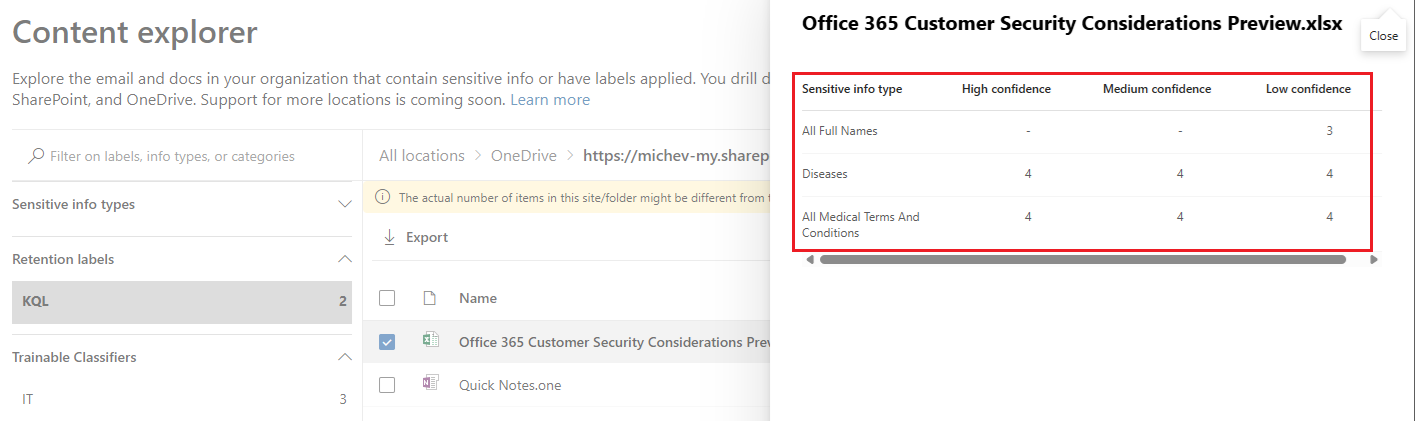
Of course, the UI does surface the “human readable” identified for the detected Sensitive Information type, but we can easily do the same by leveraging the Get-DlpSensitiveInformationType cmdlet.
Apart from surfacing Sensitive Information metadata, the Export-ContentExplorerData cmdlet can now also filter based on the confidence level of the match. This is made possible by the newly introduced -ConfidenceLevel parameter, which will accept one of the three “standard” values: high, medium and low. For example, the below cmdlet will only surface items with at least one high confidence match on the Bulgaria Uniform Civil Number sensitive info type:
Export-ContentExplorerData -TagType SensitiveInformationType -TagName "Bulgaria Uniform Civil Number" -ConfidenceLevel High
If you compare the set of results from the above cmdlet against the unfiltered one, you will notice a sizeable difference in the total count value. Well, unless your data perfectly matches this SIT, I suppose. In my tenant, the unfiltered query returned a total of 1417 items, whereas the High-confidence filtered one spans only 449. Overall, the -ConfidenceLevel filter parameter is a nice addition, and one that goes beyond what the UI can currently offer at that!
That said, there are some rough edges with the current implementation of the parameter. The Export-ContentExplorerData cmdlet will not prevent you from trying to leverage -ConfidenceLevel for scenarios where it makes no sense to use it, such as when querying against a retention label. Instead of doing some basic parameter validation, the cmdlet will happily accept the input and pass it to the backend, resulting in a non-descript error as shown below. Not only we don’t get a proper parameter validation, but the error message itself leaves a lot to be desired. I miss the times when people within Microsoft knew how to take advantage of all the goodness PowerShell has to offer!

On a more positive note, let’s also cover some other improvements we received over the past two years since the cmdlet was initially released. Back then I noted that the results returned from Export-ContentExplorerData did not seem to include any Exchange Online items, even though Content explorer tool surfaced those correctly. I am pleased to see that this is no longer the case and all the queries I tried return the correct counts and items for Exchange Online too, matching the UI behavior.
Another improvement, albeit one that contradicts the current documentation, is the fact that the default page size seems set to 1000 now, whereas previously it defaulted to 100. As handling pagination seems to be one of the common issues with the cmdlet, this increase, combined with the filtering capabilities of the cmdlet, should hopefully make it easier for the masses.